FlexiFunnels lets you upload your course videos directly into the platform and protect them with DRM (Digital Rights Management) security — the same kind of protection Netflix uses. This keeps your course videos safe from piracy: people can't download them, screen-record them, or share their login to give others free access.
You also get video hosting + DRM security together, so you don't need a separate paid host like Vimeo or Wistia.
Why this matters
Course piracy is common online. With unprotected videos, people can download or screen-record your course and resell it cheaply — which quietly steals sales from you. DRM protection shuts that down, so the course you worked hard to build stays yours.
What you get for free
Every account starts with 10 GB storage + 100 GB bandwidth of DRM-protected video, completely free.
As a rough guide, 10 GB ≈ 50 videos of about 10 minutes each, in 1080p, when compressed properly.
The 4 protections you get
When your course uses DRM-uploaded videos, FlexiFunnels protects them in four ways:
- Downloading disabled — your videos can't be downloaded on any device.
- Screen-recording prevention — like Netflix, the screen goes black if someone tries to screen-capture. This blocks ~99% of screen-capture attempts.
- Video watermarking — if someone somehow records it, their email and IP address appear on the video, making the culprit easy to trace.
- Login sharing prevention — each buyer can be logged in on a maximum of 2 devices at once, so they can't share their access widely.
Requirement: use Razorpay or CashFree
⚠️ DRM protection currently works only if you sell through the Razorpay or CashFree payment gateway. Support for other gateways is coming.
The basic flow to create and sell a DRM course:
- Create your course in FlexiFunnels.
- Integrate the CashFree or Razorpay payment gateway.
- Create a checkout page inside FlexiFunnels.
- Start selling using that checkout page.
⚠️ Razorpay users: you must enable "Razorpay Route" in your Razorpay account. If you have multiple Razorpay accounts connected to FlexiFunnels, enable Razorpay Route in every one of them — missing one is a common cause of DRM problems.
Choose the right upload option
When adding a video to your course, you'll see several options:
- YouTube
- Vimeo
- Gumlet
- Upload (DRM) ← use this one for protection
- Generic Link
? Only the Upload (DRM) option gives DRM protection. YouTube, Vimeo, Gumlet, and Generic Link videos are not DRM-secured.
Costs explained
Storage & bandwidth
After your free quota, you only pay for what you actually use (pay-per-usage — no fixed monthly fee):
- Storage: ₹60 per GB per year (~$0.7)
- Bandwidth: ₹5 per GB (~$0.06)
(Dollar prices vary with exchange rates.)
To buy more storage/bandwidth:
- Click My Profile inside your FlexiFunnels account.
- Click Video Settings and select the checkbox to add the storage/bandwidth you need.
(Screenshot: Video Settings)
? Unlike most hosts that charge a flat monthly/yearly fee whether you use it or not, here you pay only for what you consume — and only when you need it.
Reduce your cost by compressing videos
Compress your video files before uploading to shrink their size and lower your storage/bandwidth cost.
We recommend HandBrake — it's free and can reduce file size by up to ~90% with little quality loss. Download: https://handbrake.fr/downloads.php
DRM Protection Fee
A small DRM fee applies when a buyer purchases a DRM-protected course. Here's the key thing to understand: it's not always an extra charge — it's often the same 1% you'd pay anyway.
| Course price | Total charge | Extra DRM fee on top of the regular 1% |
|---|---|---|
| ₹10,000 and above | 1% | None — just the regular transaction fee |
| ₹5,000 – ₹9,999 | 1.5% | 0.5% |
| Below ₹100 | — | DRM not available (see note below) |
For other price bands, check the full fee table inside your FlexiFunnels account.
Important notes:
- The DRM fee is deducted automatically when a buyer purchases your course.
- You cannot sell a DRM-protected course for less than ₹100. For very cheap courses, host the videos on YouTube/Vimeo instead (piracy isn't really a concern at that price).
- If your course videos are hosted on YouTube, Vimeo, or another third party, no DRM fee applies — but those videos also won't be DRM-secured.
Manually adding members (for direct payments)
Sometimes a buyer pays you directly (e.g. via UPI) instead of through your checkout page. In that case, you give them access manually:
- Go to My Profile in FlexiFunnels.
- Click Add Members.
- Use the Select Product dropdown to pick the course.
- Enter the number of users to give access to.
For DRM courses, you'll pay the small DRM Protection Fee for that number of members, then add them.
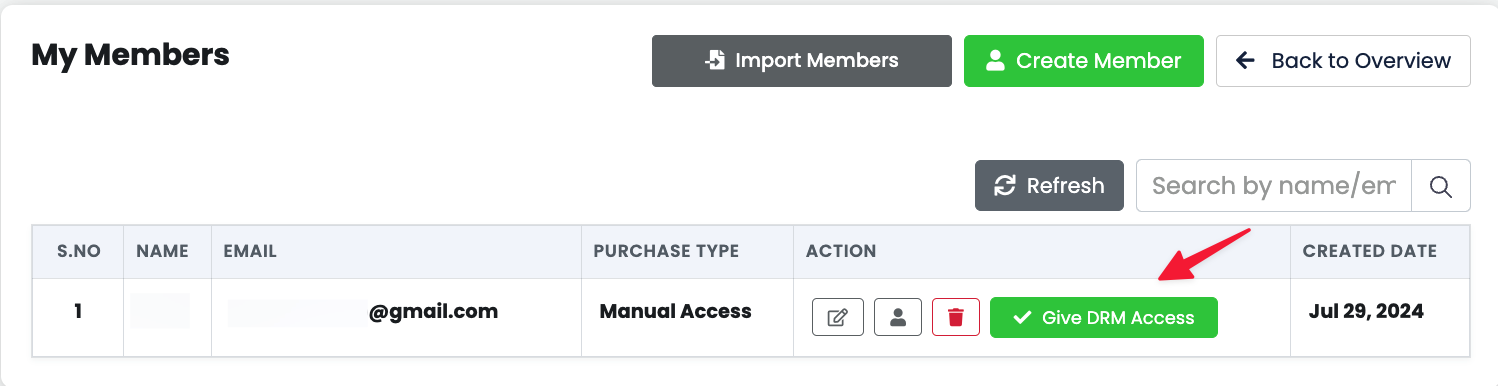
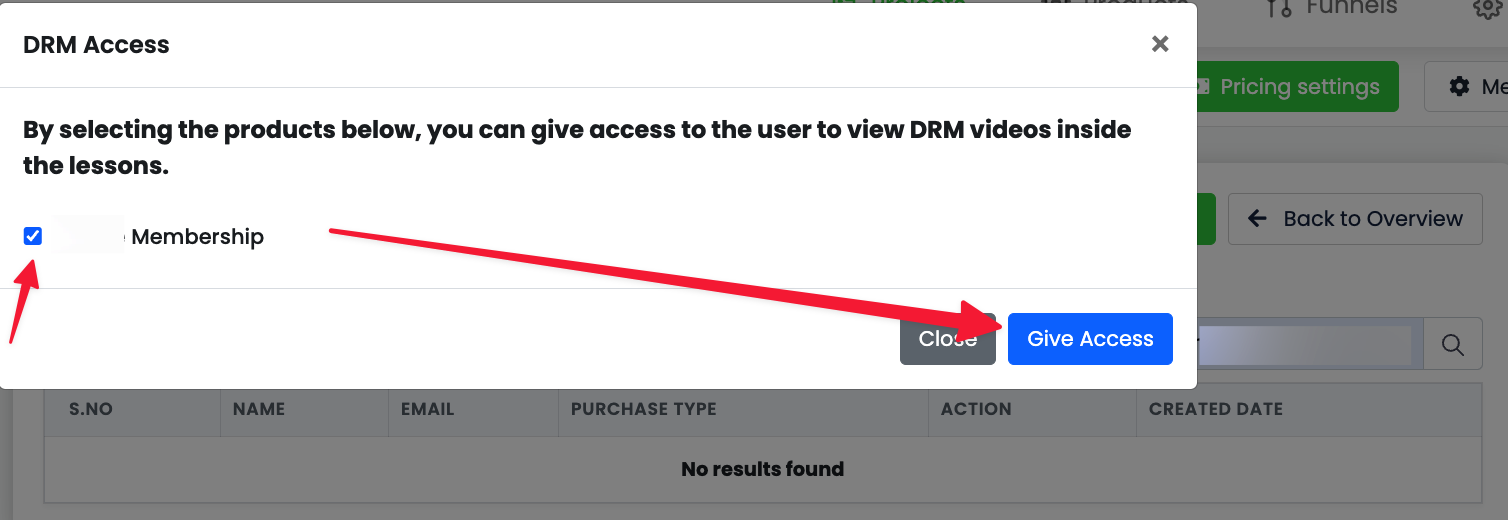
? Converting a normal membership to DRM? If your membership had non-DRM videos (YouTube, Vimeo, generic uploads) and you switch it to DRM, a "Give DRM Access" button appears. Use it to purchase the member licenses and assign DRM access to existing members — this is required if the DRM fee wasn't already collected during the conversion.
How to turn on DRM for your course
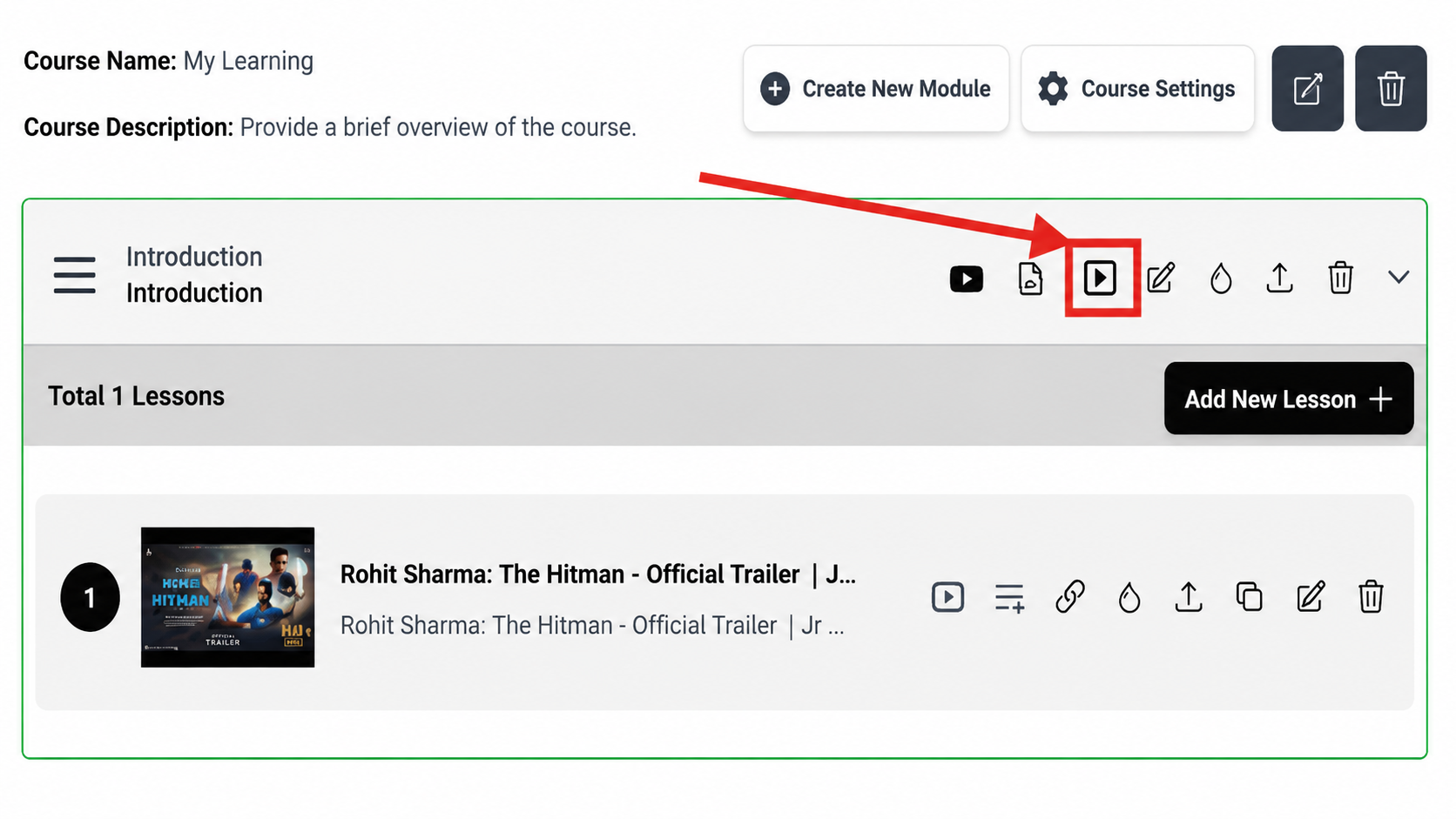
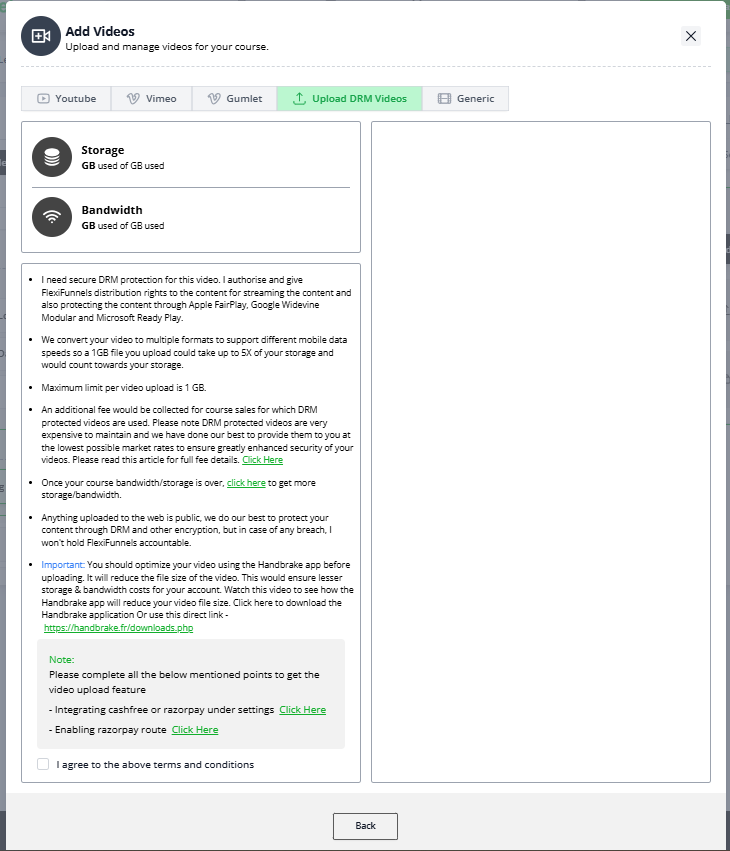
Step 1 - You need to click on the "My Profile" button inside your FlexiFunnels account.
Step 2 - Click on "video settings" & select the check-box (Check the screenshot below).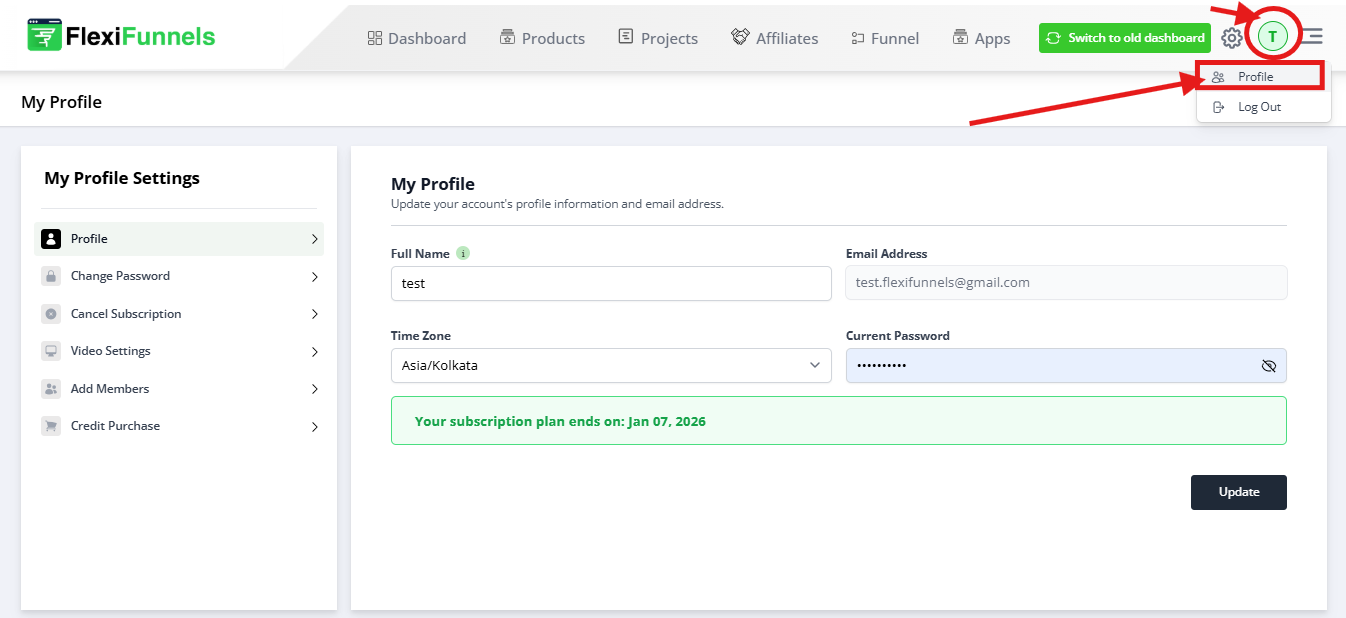
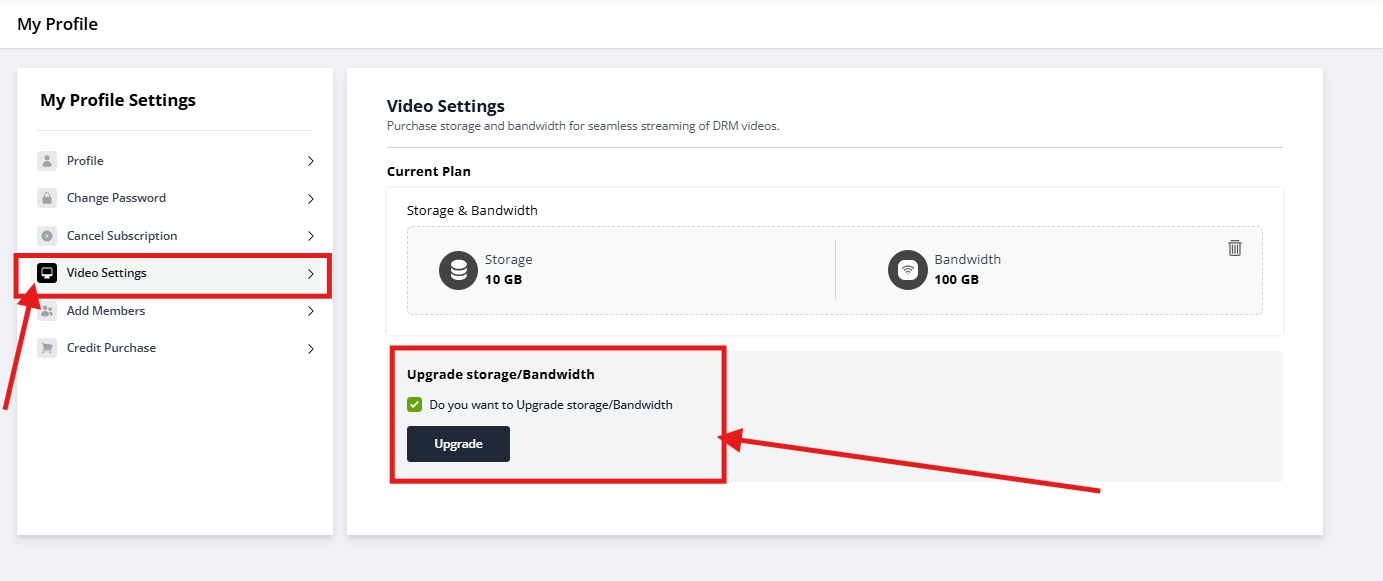
This is the minimum possible storage/bandwidth cost as per the regular market rates. We are actually paying from our pocket to help you get the storage/bandwidth at this low cost.
The best part is you can buy storage & bandwidth according to your REQUIREMENT whenever you need it. Unlike most video hosting providers where you have to pay a monthly charge does not matter whether you are consuming any bandwidth or storage. Over here we have created a pay-per-usage model for you. So you only pay for what you use. Rather than paying every month/year without even using it.
This is a huge cost saver if you get the logic. To get an idea, you can go & check the monthly recurring market price of DRM-protected video streaming to know the real cost. Which is actually twice or sometimes thrice what we have made available for you. And that double costing is monthly/yearly recurring. While we have brought DRM Video streaming at half the cost at pay per usage model for you. This is a huge cost saver.
3. Compress Your Video File Size to Reduce The Storage & Bandwidth Cost - Use a video compressor to compress your video file size before uploading your video. This will reduce the video size & hence your cost.
There are multiple video compressors available in the market that help you to compress your video file. We recommend using Handbrake application. It is free of cost & it does video compression without compromising on the quality of the video. Handbrake video compression reduces file size by almost 90%. That's a huge cost saver. Watch this video to see how easily you can compress a video using Handbrake.
Click here to download the Handbrake application.
Or use this direct link - https://handbrake.fr/downloads.php
Once you have compressed your videos, you can now upload them & get your course ready.
4. Your course is now DRM Security Video Protection Enabled - Here is everything that is being done to prevent your course piracy & illegal downloads:
- Downloading Disabled - Your course videos cannot be downloaded anywhere on any device.
- Screen Recording Prevention - Just like Netflix when someone will try to screen capture your course video, the screen will become black. DRM protection disables 99% of the screen-capturing risk
- Video Watermarking - In case someone still manages to screen capture your course video content, it will have their email id & IP address on top of the video screen which will make it easy to track the person who did the illegal download & stop the course piracy
- Course Sharing Prevention - Not just that, inside FlexiFunnels we have also ensured that your course can only be logged in from a maximum of 2 devices at the same time. This will ensure that your course buyer does not share their login access & there are people who can watch your course for free.
5. DRM Protection Course Streaming Fee - We have given DRM Protected 10 GB Storage & 100 GB Bandwidth absolutely Free to all the accounts. We have even provided you with Video Storage & Bandwidth at the lowest price possible at pay per usage model. All this plus video streaming is a direct cost to us.
To help us cover that cost, there will be a small fee for your course DRM protection. But honestly, this very small fee is nothing in comparison to the loss that a course creator faces if their course gets pirated.
We have created fee slabs based on your course pricing.
Here it is:

Please Note:
- The DRM Protection Fee will be automatically deducted when a buyer will purchase your course online
- You cannot sell a DRM-protected course for less than Rs 100
- There is a regular 1% transaction charge when you sell your product/services using the advanced checkout pages of FlexiFunnels which helps you convert more sales. This DRM protection fee is NOT an additional charge. So if your course price is Rs 10,000 or above, you will just be paying the regular 1% transaction fee. That's it. So there is no additional DRM Protection Fee for you. Similarly, if your course price is between Rs 5,000 - Rs 9,999, there will be a 1.5% total charge which is just a 0.5% additional DRM Protection Fee on top of the regular 1% transaction charge
- If your course videos are hosted on Youtube or Vimeo, there will be no DRM Protection Fee applicable to your course sales. (However, they will not be DRM secured either). Only in your courses in which you have uploaded a DRM-protected video, the DRM Protection Fee would be applicable
6. Manually Adding/Importing a Course Member - FlexiFunnels has provided you with the feature to manually add/import course members.
Let's suppose your course buyer pays the course amount to you via UPI directly or uses any other payment method to pay the course amount to you directly. In this case, you will have to manually create access for your buyer by using the manual add/import feature of FlexiFunnels.

In the scenario when the course buyer has paid you directly, then you need to pay the DRM Protection Fee manually.
Here's how you can do it:
Step 1 - Go to the "My Profile" section inside FlexiFunnels
Step 2 - Click on the "Add Members" button
Step 3 - Click on the "Select Product" Dropdown for the product you want to give access
Step 4 - Add the number of users to whom you want to give access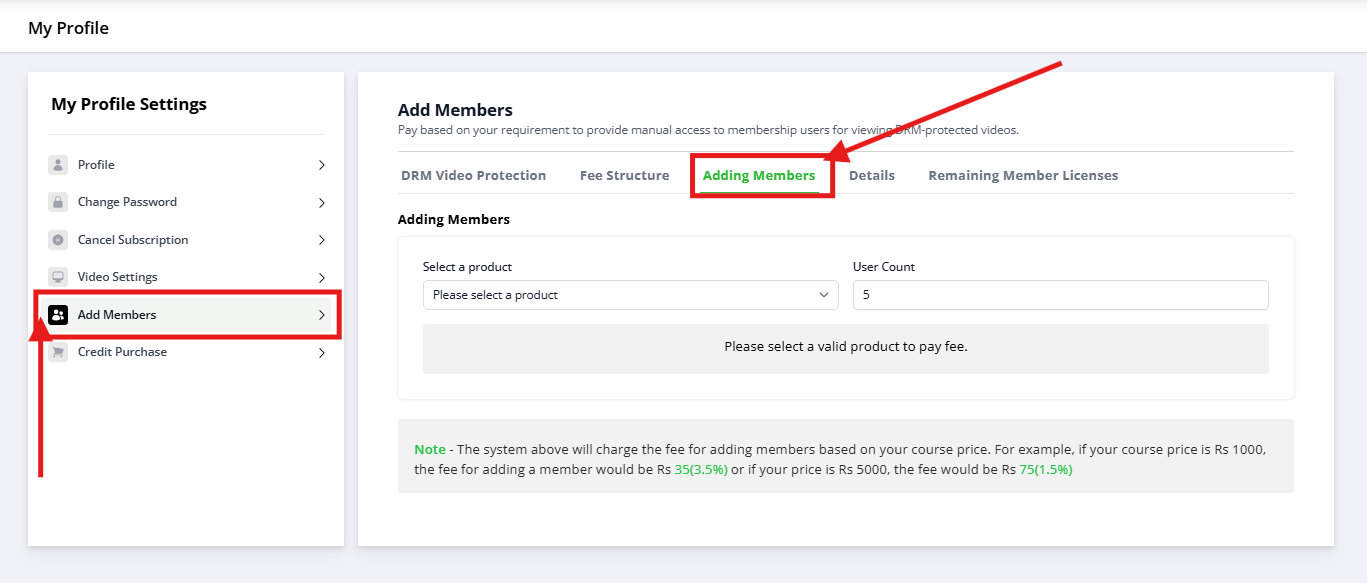
Here you can pay the small DRM Protection Fee for the number of members you want to add & then you can add the same number of members to your course.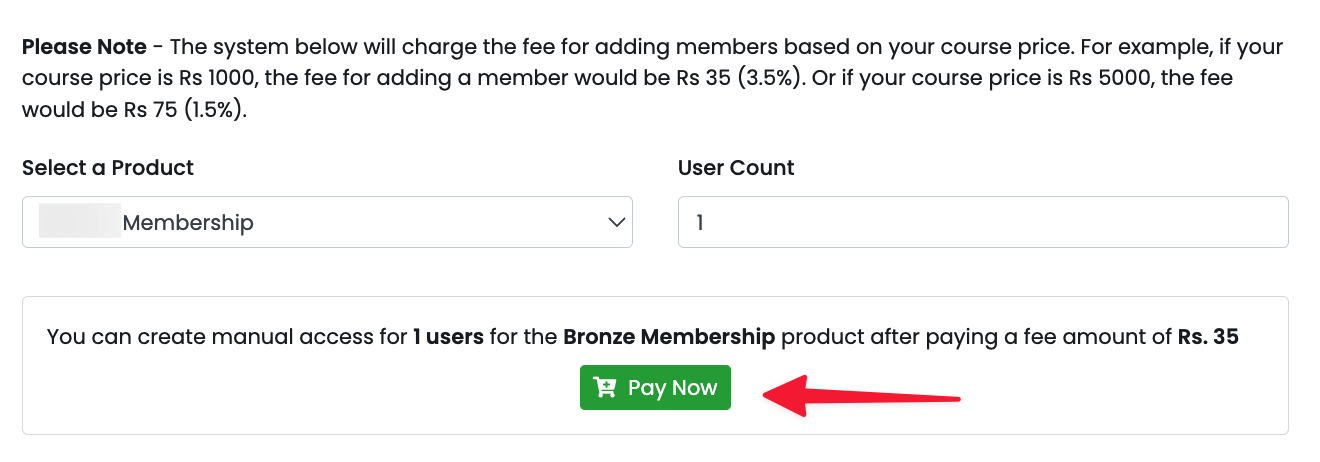
Note: When converting a standard membership (which includes videos from platforms like YouTube, Vimeo, or generic video uploads) to a DRM-protected membership, a "Give DRM Access" button will appear. This button is essential because it allows you to manually assign DRM access to members.
Important: DRM protection requires an additional fee. If this fee has not been received during the conversion from normal to DRM membership, the "Give DRM Access" button will ensure that the necessary manual member licenses are purchased for all members who wish to view DRM-protected videos.
| Additional Note from FlexiFunnels Founder - Saurabh Bhatnagar Course piracy is a huge challenge for course creators. I have been a successful course seller myself in the past & I have faced massive course piracy issues. I used to sell my course "Timeline Domination" for Rs 28,000. Though we were making good sales. But every month we were losing at least 20-30 extra sales because of the course piracy. That's almost Rs 9 Lakh loss every month. Plus it is not just the revenue loss, it is also a loss of the successful case studies. That's a massive loss. There were scammers who were reaching out to my social media followers, commenting on my ads & whatnot selling my course at a far lesser price. It became so bad & came to a stage that we had to take action. We created a 2 member team just to stop piracy, prepared a sheet of all the scammers (see below), and then we had to work with a lawyer to officially take action against the ones who did not stop our course piracy.  It took a massive amount of time, effort plus lawyer fees to get hold of the situation. Which we were never able to control completely 100%. There were more than 250+ names just in this sheet alone who were doing my course piracy. It was a big time + effort + focus + revenue loss. That's the reason why when we decided to launch FlexiFunnels, we were very clear that we are gonna provide DRM video protection service to our customers. So you don't have to face & go through all the challenges & losses that I had to face. We have worked extensively for a good 6 months alone just to ensure course DRM Protection for you when you sell your course on FlexiFunnels. And that too we have provided to you at the lowest possible market price. Just to give you an idea of the market pricing, here is a screenshot of the email I received from Vimeo after my course started doing decent sales.
So as you can notice I am getting Non-DRM Video Hosting from Vimeo for a $0.10/GB Bandwidth price when I am choosing the 25,000 GB Annual plan. And $0.07/GB Bandwidth price when I am choosing the 100,000 GB Annual plan. The problem here is:
In short, I was paying more amount per GB bandwidth & Storage to Vimeo than FlexiFunnels (almost double) for Non-DRM video hosting which can be easily pirated and I was not even consuming my full storage/bandwidth quota. So I am at a huge loss in every way. Inside FlexiFunnels, we have ensured the lowest cost for you that too for DRM-secured content and that too for only the storage/bandwidth you are consuming. Please Note: We are not able to provide you DRM Protection for courses priced below Rs 100. That's because as we mentioned earlier DRM Video Protection is expensive and it will be impossible for us to sustain if you sell your course for less than Rs 100. Because the DRM Protection Fee would be way too less for us to sustain the service. For your higher priced courses, you have to definitely ensure they are DRM-level secured to avoid all the troubles + losses that you can face in future, all the ones that I had to face. But don't worry you won't have to face them. We have ensured this for you :) |

Common situations & quick fixes
Before contacting support, check these — they cover the most common DRM questions.
My videos aren't DRM-protected even though I uploaded them. Make sure you used the Upload (DRM) option when adding the video. Videos added via YouTube, Vimeo, Gumlet, or Generic Link are not DRM-secured.
DRM isn't available / I can't enable it. DRM currently works only with the Razorpay or CashFree gateway. If you're on Razorpay, confirm Razorpay Route is enabled — and if you have multiple Razorpay accounts connected, enable it in all of them.
A buyer paid me directly — how do they get access? Add them manually via My Profile → Add Members → Select Product, enter the number of members, and pay the DRM fee for them. If you're converting a non-DRM membership to DRM, use the "Give DRM Access" button.
My storage or bandwidth ran out / videos stopped playing. You've likely used your free quota. Buy more under My Profile → Video Settings, and compress future uploads with HandBrake to stretch it further.
My costs feel high. Compress your videos before uploading (HandBrake can cut file size ~90%). Smaller files use less storage and bandwidth, which directly lowers your cost.
My buyer says they can't log in on another device. That's by design — each buyer can be logged in on a maximum of 2 devices at the same time to prevent login sharing. They may need to log out of one device first.
Can I sell a DRM course under ₹100? No — DRM isn't available below ₹100. Host those videos on YouTube/Vimeo and sell the course on FlexiFunnels without DRM (no DRM fee applies in that case).
Was this article helpful?
That’s Great!
Thank you for your feedback
Sorry! We couldn't be helpful
Thank you for your feedback
Feedback sent
We appreciate your effort and will try to fix the article