What Is a Custom Domain?
A Custom Domain is your own web address (like www.yourbrand.com) instead of FlexiFunnels' default URL.
Think of it like: Renting a storefront with your name on it vs. operating from someone else's building.
Examples:
www.yourbrand.com(your brand domain)webinar.yourbrand.com(subdomain)checkout.yourbrand.com(another subdomain)offer.yourname.com(branded, short)
Connect Domain to Landing Page
Step: Go to Project Settings
- In FlexiFunnels, go to "Projects"
- Find the project with your landing page
- Click on the "Open Project" to open it
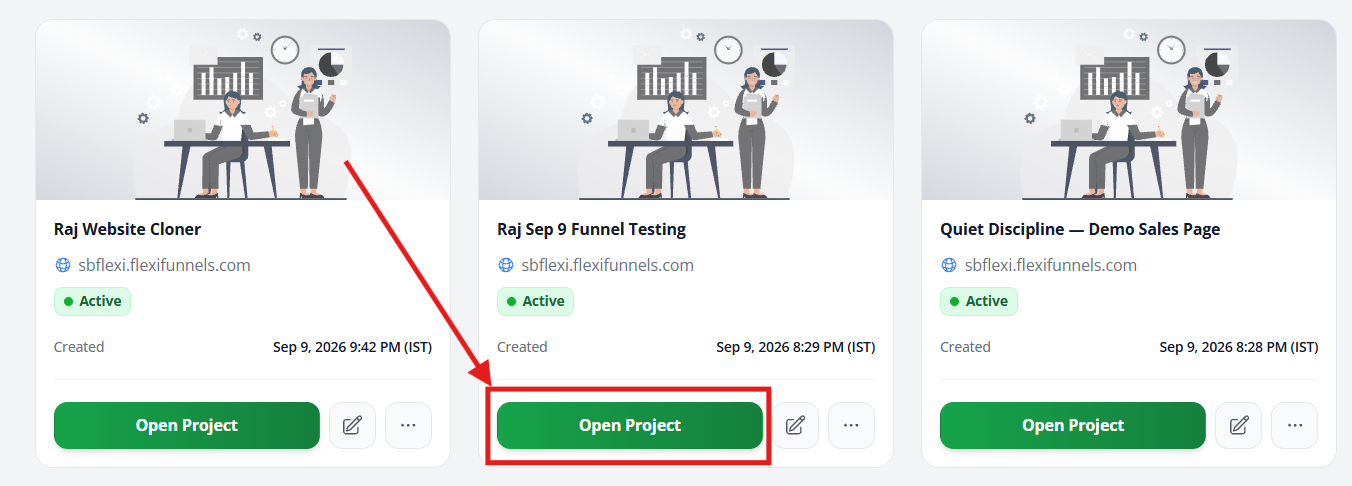 Step: Open Project Settings
- In the top-right corner, look for a "Settings" button or gear icon
- Click it
- A menu appears
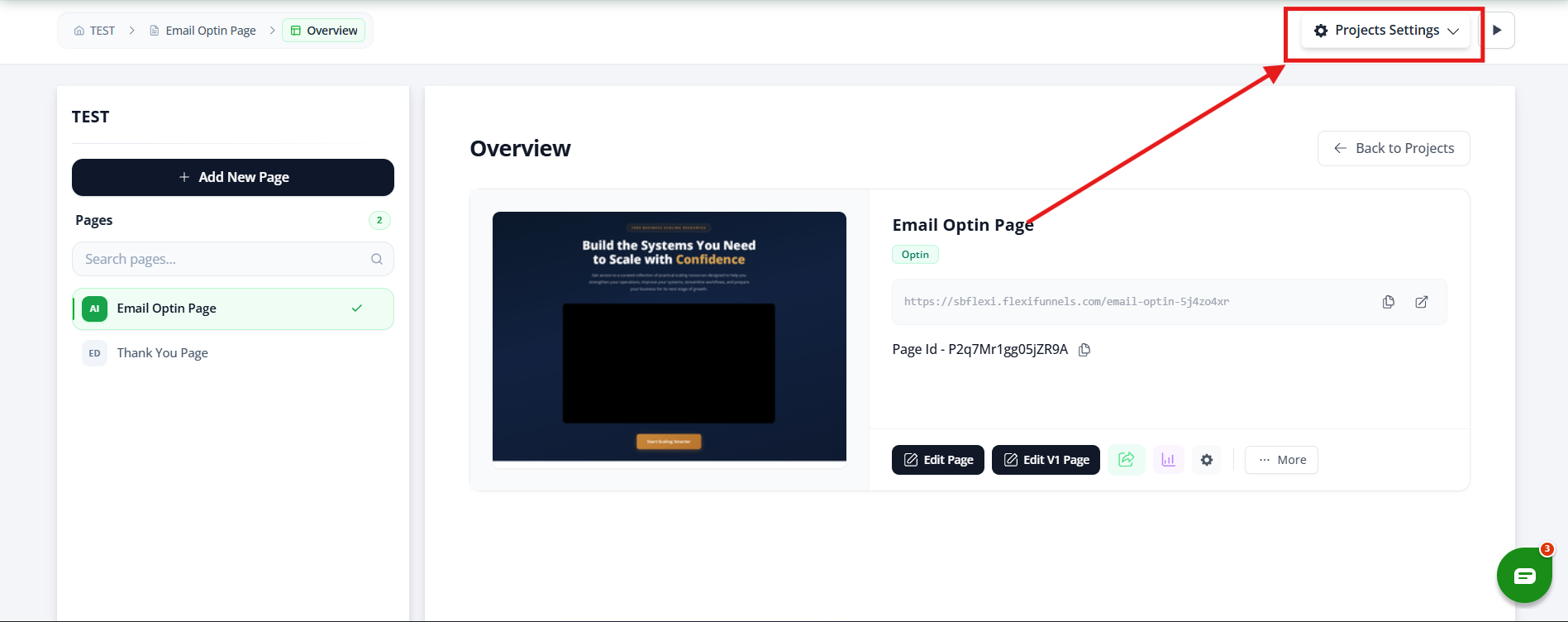
Step: Select General Settings
- From the menu, click "General Settings" (or just "Settings")
- The project settings panel opens
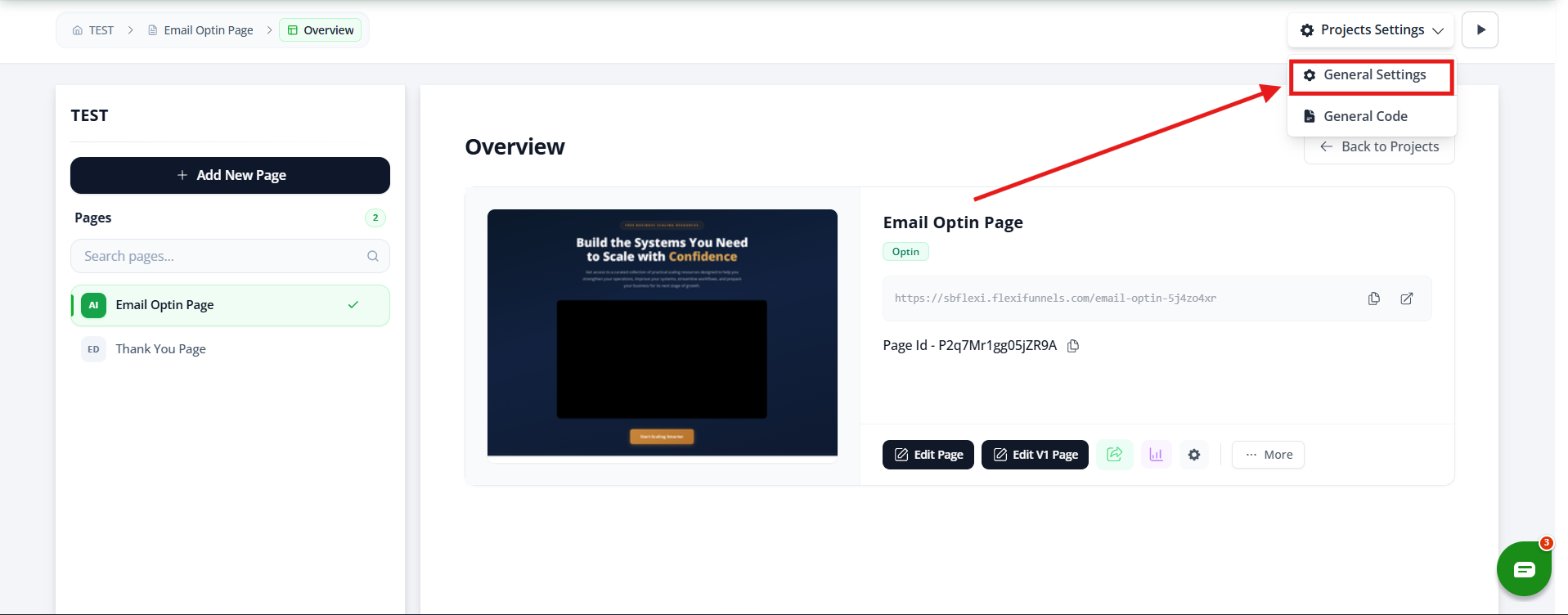
Step: Find Domain Selection
- Look for a field labeled "Select Domain" or "Choose Domain"
- Click the dropdown menu
- You'll see a list of domains you've added (from Part 1)
Step: Select Your Domain
- Click on the domain you want to use
- Example:
yourbrand.comorwebinar.yourbrand.com
Note: If your domain doesn't show up:
- Make sure you completed Part 1 (added domain to FlexiFunnels)
- Make sure the domain is verified (not pending)
- Refresh the page and try again
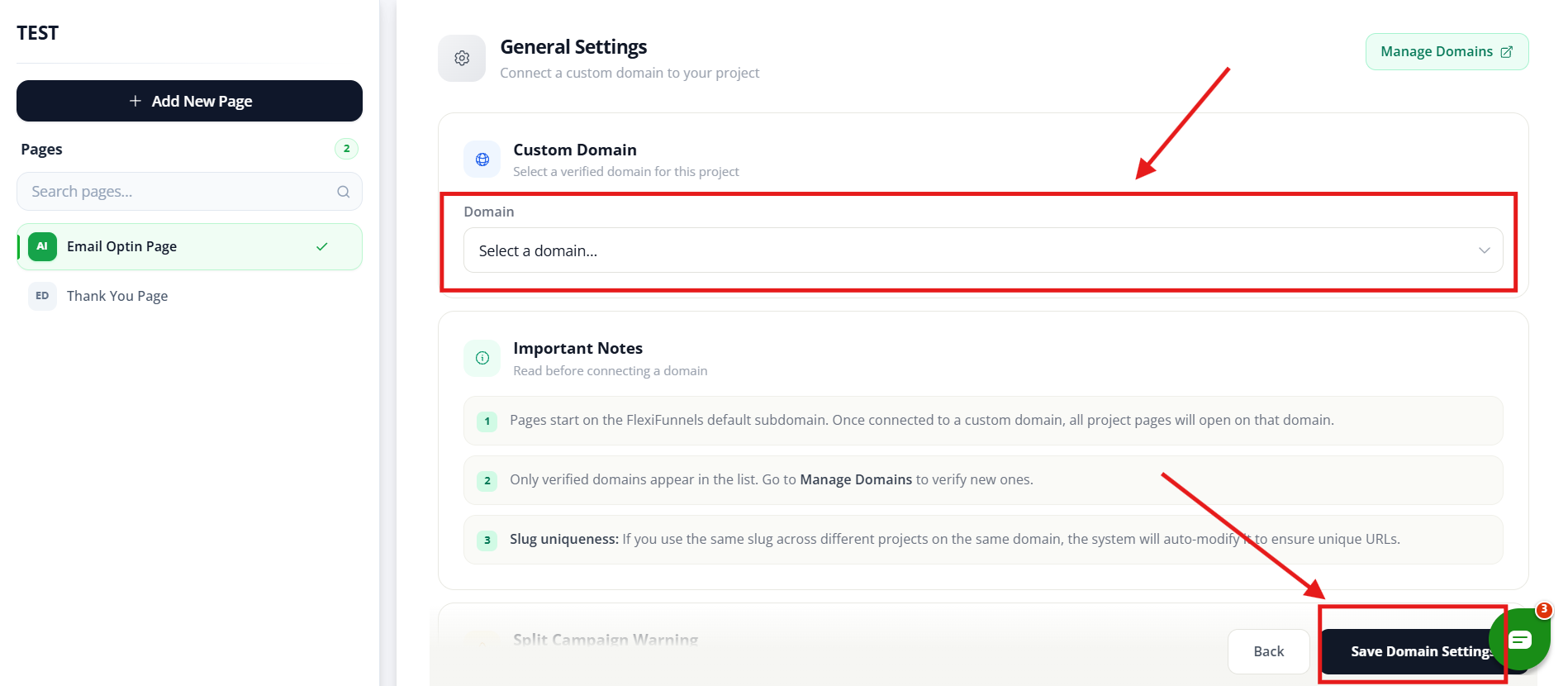
Step: Save Settings
- Scroll down to the bottom
- Click "Save" or "Update Settings"
- A confirmation message appears
✓ Your domain is now connected to your project!
Common Situations & Quick Fixes
Situation 1: "My Domain Doesn't Show Up in the Dropdown"
What's happening: You can't find your domain when trying to connect it.
Diagnostic steps:
- Verify domain was added
- Go to Settings → Integrations → Domains
- Do you see your domain listed?
- If not, go back to Part 1 and add it
- Check domain status
- Is the domain "Verified" or still "Pending"?
- Pending domains may not show in the dropdown
- Wait for verification email (24-48 hours)
- Refresh page
- Refresh the project settings page (F5)
- Sometimes it takes a moment to appear
- Check for typos
- Is the domain spelled correctly?
- Did you use the right format (no https://, no www if not needed)?
If still not working:
- Delete and re-add the domain
- Contact FlexiFunnels support
Situation 2: "I Connected the Domain, But the Page Doesn't Load"
What's happening: Domain is connected but visiting it shows an error.
Diagnostic steps:
- Wait for DNS propagation
- DNS changes take 24-48 hours to propagate worldwide
- What works for you might not work for others yet
- Wait 24 hours and try again
- Check domain verification
- Go to Settings → Integrations → Domains
- Is your domain marked "Verified"?
- If "Pending," the DNS records haven't been recognized yet
- Verify DNS records (if manual setup)
- Log into your domain registrar
- Go to DNS settings
- Confirm the records you added are still there
- Sometimes they're deleted or overwritten
- Check project is published
- Go to your project
- Is the landing page published?
- Unpublished pages won't appear on custom domains
- Try a different browser
- Sometimes browser cache causes issues
- Try Chrome, Firefox, Safari on the same device
- Try incognito/private browsing mode
If still not working:
- Contact FlexiFunnels support with:
- Your domain name
- Your domain registrar
- Proof that DNS records are added
Situation 3: "I Have Multiple Pages, Do They All Show on the Custom Domain?"
What's happening: You have multiple pages and wonder how they work with the domain.
Answer: Yes, all pages in the project use the custom domain.
Situation 4: "Should I Use www or Without www?"
What's happening: You're unsure about domain format.
Answer: Both work. Pick one and be consistent.
Best practice:
- Choose ONE: Either
yourbrand.comORwww.yourbrand.com - Use it everywhere (emails, business cards, ads)
- Set up redirect so both work
- Example: If you choose with www, redirect without-www to with-www
- Visitors get the right version either way
How: Ask FlexiFunnels support to set up the redirect
Situation 5: "Can I Connect Multiple Domains to One Project?"
What's happening: You want the same landing page accessible from multiple domains.
Answer: Technically yes, but it's tricky. Better approach:
Instead:
- Create separate projects for each domain
- Keep the same landing page design
- Connect each project to a different domain
- Each domain has its own project and URL
Why: Each project can only connect to o
Was this article helpful?
That’s Great!
Thank you for your feedback
Sorry! We couldn't be helpful
Thank you for your feedback
Feedback sent
We appreciate your effort and will try to fix the article