A bump offer is an extra product presented to customers right at checkout, perfectly timed after they have decided to buy your main product but before they complete payment. Sometimes, you need to hide that extra offer temporarily.
Think of it like a restaurant's "Soup of the Day" sign. When the kitchen runs out of soup, the manager doesn't throw the entire sign in the trash or print a brand new menu. They simply flip a small switch on the wall to turn the neon sign off.
In FlexiFunnels, the bump offer Status toggle works exactly the same way. It is a simple on/off switch that controls whether your customers can see your extra offer. When the switch is green, your offer is live and ready for purchases. When the switch is gray, the offer vanishes from the page.
You do not have to delete your hard work. You do not have to rebuild the checkout page from scratch. This guide covers how to use this toggle to effortlessly manage your checkout promotions, allowing you to pause and resume offers with a single click.
WHY IT MATTERS
Hiding a bump offer instead of deleting it saves you massive amounts of time and frustration. When you permanently delete a product from your funnel, all the backend settings, pricing connections, and email automations vanish. If you ever want to sell that item again, you must start from scratch. The status toggle protects your setup by simply hiding the visual box from the customer while keeping your backend mechanics perfectly intact.
This flexibility gives you total control over your revenue strategies. You can run highly profitable weekend flash sales by toggling the bump on Friday night and turning it off Monday morning. If a physical product runs out of stock, you can instantly pause the offer to prevent refunds and angry emails. It gives you the power to adapt your checkout experience in seconds without ever needing to open the page builder.
PREREQUISITES / BEFORE YOU START
Before you can pause or resume a bump offer, make sure you have the following ready:
A Created Bump Product: You must have an extra product already set up in your main dashboard.
An Active Funnel: You need a published checkout page.
An Existing Bump Setup: You must have previously linked the bump product to your funnel and placed the Order Bump visual element onto your page.
? Tip: If you have not actually built a bump offer yet, this toggle will not exist in your settings. Please read our primary guide on How to Create and Add a Bump Offer first, then return here when you need to pause it.
STEP-BY-STEP SETUP
Follow these exact steps to easily pause or resume your bump offer.
Step 1: Locate Your Bump Settings
- Log in to your FlexiFunnels dashboard and navigate to Products.
- Open the specific Product that contains your checkout page.
- On the right hand side you'll be able to see option labelled "Bump".
- Click on "Bump" and here you'll see your bump products list (If Created Any).
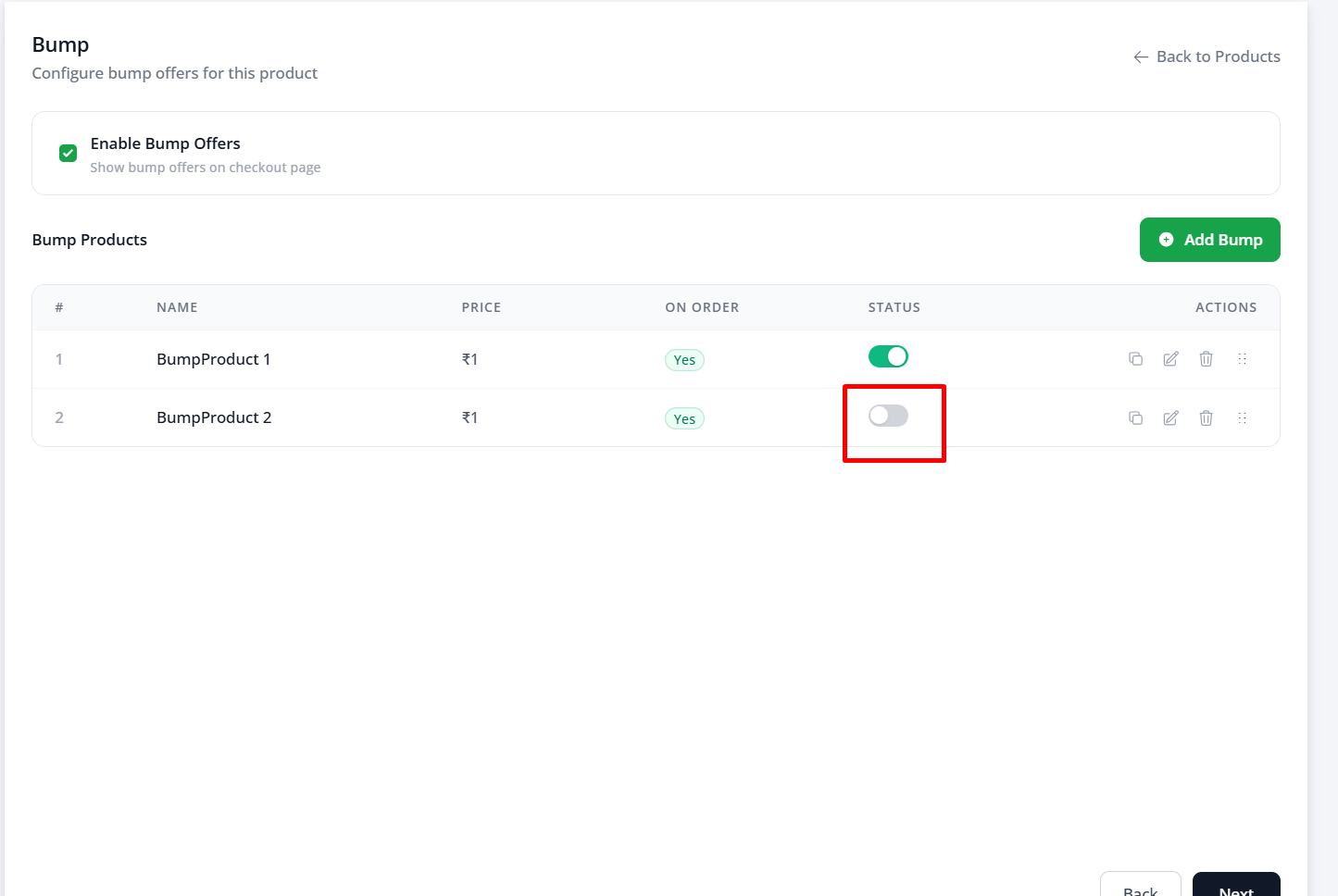
Next to the bump product name, locate the toggle switch labeled Status.
To SHOW the bump: Click the toggle so it turns green (Enabled).
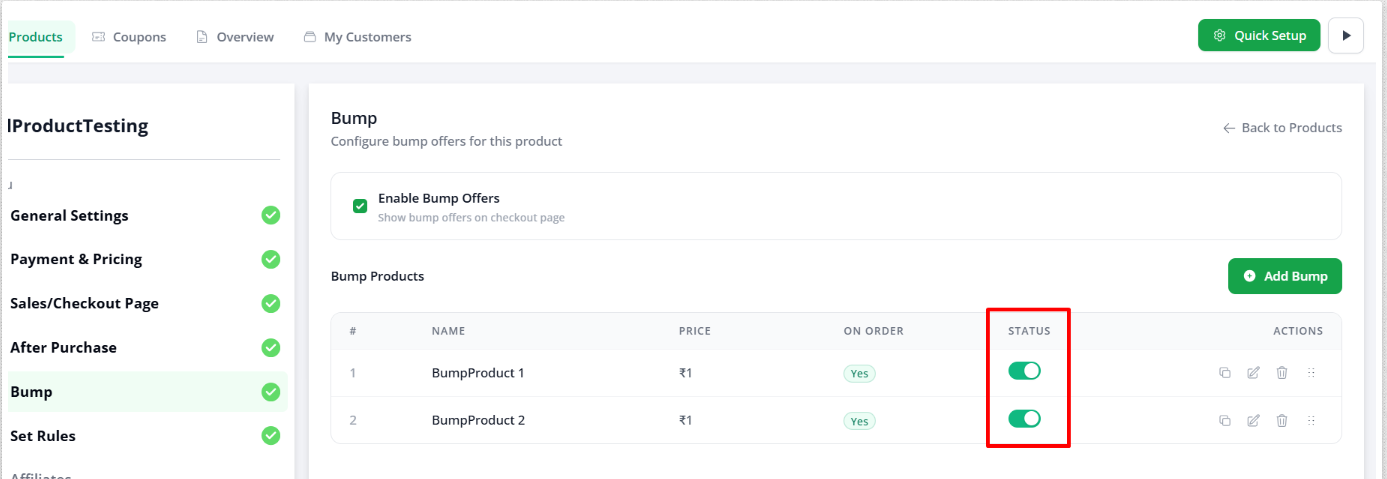
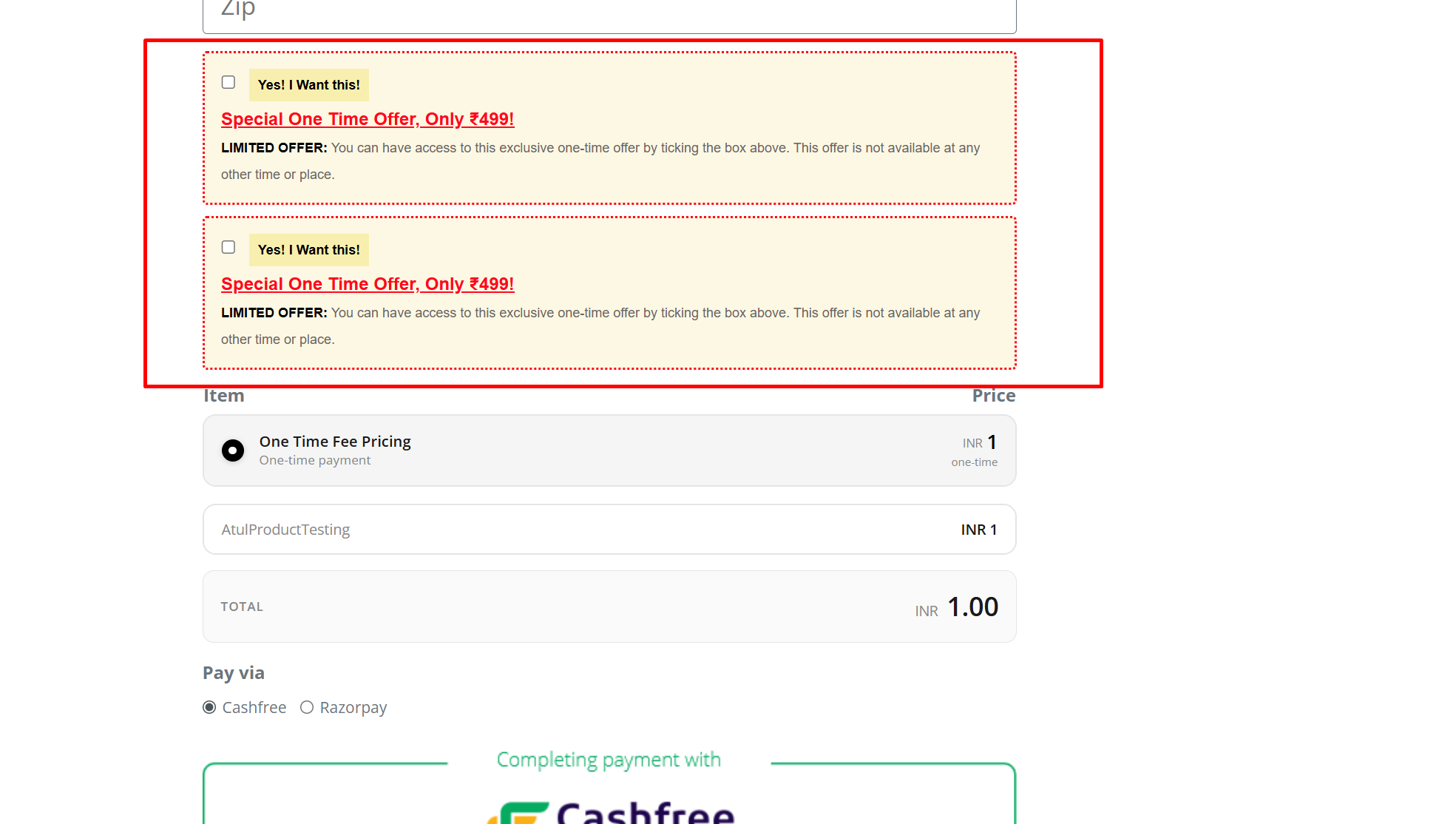
- By doing this on your checkout page you'll be able to see all bump products selected.
To HIDE the bump: Click the toggle so it turns gray (Disabled).
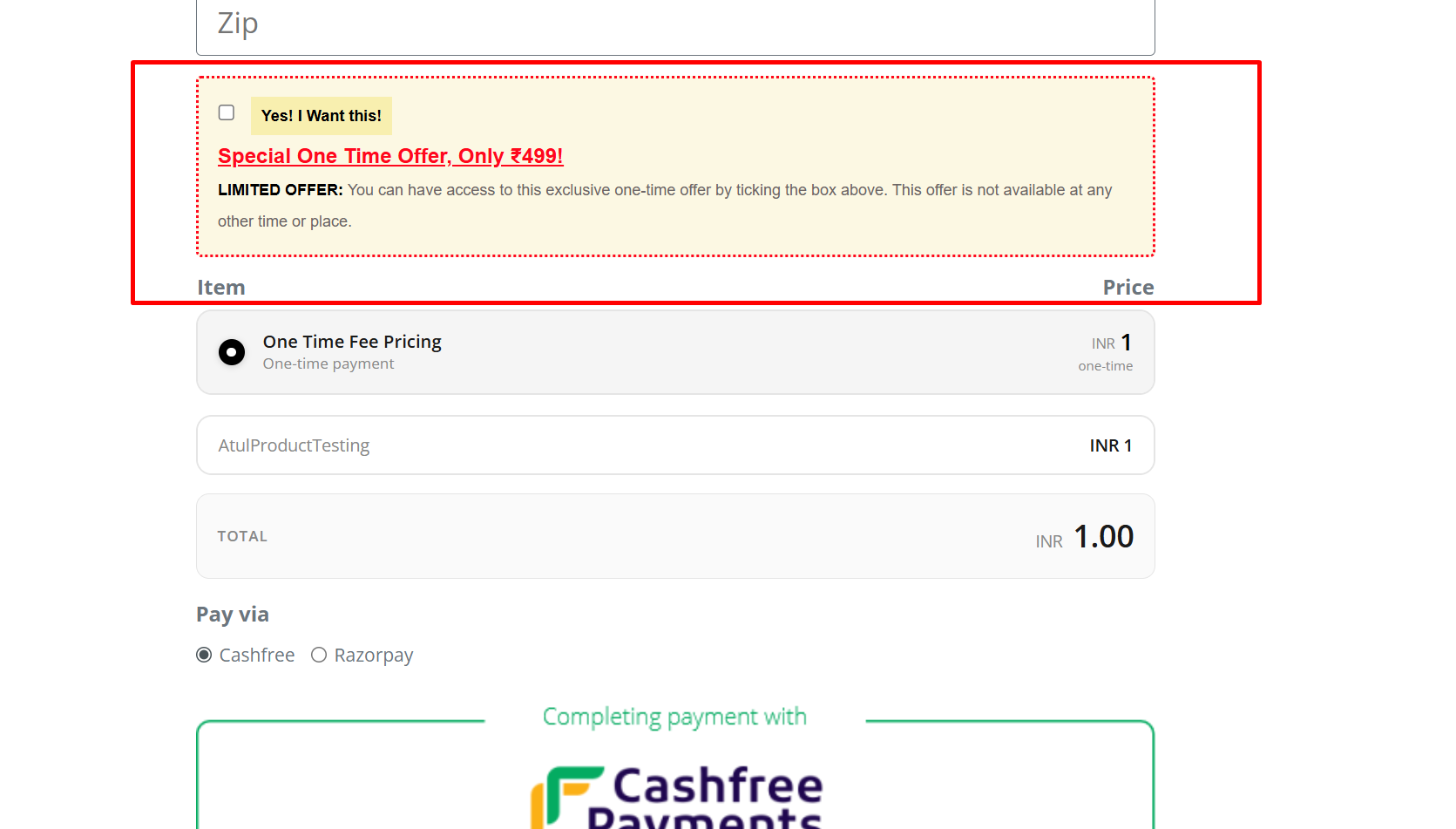
Checkout result:
Notes
- Disabling a bump hides it without deleting it, so you can re-enable the same bump later without recreating it.
- After changing the status, refresh or re-open the checkout page to confirm the bump appears or disappears as expected.
TESTING / VERIFICATION
Always test your changes on the live internet. Do not rely on the page editor preview, as it does not process live payment rules or dynamic toggles.
Open an Incognito (or Private browsing) window to ensure you aren't looking at a cached, older version of your page.
Load your published checkout page URL.
If you disabled the bump, ensure the box is completely gone. If you enabled it, verify the text and checkbox look correct.
REAL-WORLD WORKFLOWS
Here is exactly what it looks like when you integrate this feature into your daily business operations.
Workflow A: Launching a Weekend Promo
Setup: You have a special $10 template bundle prepared specifically for the weekend.
Action:
Friday at 5:00 PM, you open Funnel Settings.
You switch the bump Status toggle to ON.
You click Save Settings.
Outcome: Weekend traffic immediately sees the offer, and you collect extra revenue for 48 hours.
Follow-up: Monday at 8:00 AM, you switch the Status to OFF. The offer vanishes seamlessly without needing to edit the page.
Workflow B: The Emergency Fix
Setup: Your bump offer is live, but a customer emails you saying the PDF download file is corrupted.
Action:
You immediately go to Funnel Settings.
You toggle the bump Status OFF and hit Save.
Outcome: The broken offer is hidden from the public instantly. No new customers experience the error or demand refunds.
Follow-up: You take your time fixing the file securely in your Products dashboard. Once repaired, you toggle the Status back ON to resume sales.
COMMON SITUATIONS & QUICK FIXES
Sometimes things don't behave exactly as expected. Here are the most common support issues and exactly how to resolve them before reaching out to the team.
"I toggled the bump OFF, but I still see it on my page."
Checklist:
Did you click the green Save Settings button?
Are you looking at an old, cached version of the page?
Solution: Merely clicking the toggle switch does nothing until you save it. Go back, ensure the toggle is gray, and firmly click Save Settings. Then, open your live URL in a brand new Incognito window. Browsers often "remember" old pages to load them faster. Incognito mode forces the browser to fetch the newest, updated version of your checkout page.
"I toggled the bump ON, but it isn't appearing on checkout."
Checklist:
Is the visual "Order Bump Element" actually placed in the page builder?
Did you publish the page after adding the visual element?
Solution: The Status toggle only controls the backend product connection. It simply tells the system, "You are allowed to show this." However, if you never dragged the visual Order Bump box onto your page using the Edit Page builder, there is nowhere for the offer to display. Open your page editor, drag the bump element above your checkout button, save, and publish.
"I accidentally clicked the Trash Can instead of the Toggle."
Checklist:
Did the product disappear from the settings list entirely?
Solution: If you clicked the red trash can icon, you permanently unlinked the product from that page. You cannot undo this with a simple toggle. You must click the Add Bump Product button again, select your item from the dropdown menu, click Save, and then ensure the new toggle is set to ON.
"My main product disappeared when I toggled the bump off."
Checklist:
Did you accidentally toggle the status of the Main Product instead?
Solution: Both your Main Product and your Bump Product have their own identical status toggles in the settings panel. If your entire checkout page looks broken and won't accept payments, you likely disabled the primary product by mistake. Go back to your Funnel Settings, ensure the Main Product toggle is green (ON), and the Bump Product toggle is gray (OFF).
"I changed the price of the bump while it was disabled, and now it looks wrong."
Checklist:
Did you update the manual text inside the page builder?
Solution: The Status toggle strictly pauses the checkout mechanics. However, if you originally typed "Add this for $10!" in the page builder, and you just changed the actual product price to $20 in your dashboard while it was hidden, the text will not magically rewrite itself. You must open the Edit Page builder and manually rewrite the description to match your new price before toggling it back ON.
BEST PRACTICES
Follow these simple rules to manage your funnel operations smoothly.
Use the toggle, don't delete: Never use the trash can icon to remove a bump product from your funnel settings unless you are 100% sure you will never, ever sell it again. Toggling preserves your data.
Double-check your switches: When managing multiple products on one page, take an extra three seconds to ensure you are clicking the Status toggle for the Bump Product, not accidentally turning off your Main Product.
Update copy before resuming: If your bump was paused for a long time, briefly review the sales copy in the page builder before toggling it back on to ensure the offer still makes logical sense.
Don't toggle out of panic: If your page is receiving massive traffic and a minor typo is found in the bump description, don't toggle it off and lose sales. Open the page builder, fix the typo, and hit publish while the sales keep rolling in. Save the toggle for inventory limits or strategic pauses.
Was this article helpful?
That’s Great!
Thank you for your feedback
Sorry! We couldn't be helpful
Thank you for your feedback
Feedback sent
We appreciate your effort and will try to fix the article