Launching your Sales or Support Agent is only the beginning. To ensure your AI agents continue delivering accurate, helpful, and high-quality responses, you should regularly review their conversations and refine their knowledge base.
In Part 1, you rehearsed with your new hire before their first shift. Part 2 is the ongoing coaching after they start. Even a great employee gets better with regular feedback — a manager who listens in on calls, spots the questions that tripped them up, and fills those gaps in training. Unlike a one-time setup, optimization is an ongoing process: as your customers ask new questions and your business evolves, updating your Product Knowledge Base continuously improves your agents' performance.
Why Continuous Optimization Matters
Every customer interaction provides valuable insights into how your AI agent performs. By reviewing conversations regularly, you can:
- Identify questions the agent couldn't answer accurately
- Discover missing information in your Product Knowledge Base
- Improve response quality and consistency
- Increase customer satisfaction
- Ensure your AI agent stays aligned with your latest business information
The Ongoing Optimization Loop
Step 1: Review Customer Conversations
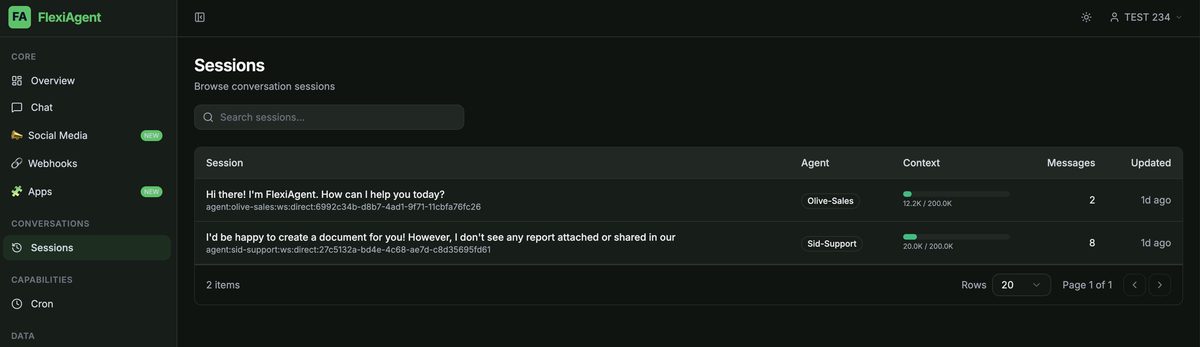
Navigate to the Sessions tab in your FlexiAgent dashboard. The Sessions page contains the complete history of conversations handled by your AI agents. Here, you can review:
- Customer questions
- AI-generated responses
- The agent's reasoning process
- Complete conversation history
Reviewing these sessions helps you understand how your AI agent interacts with real customers — which is often quite different from your test questions.
Step 2: Identify Areas for Improvement
As you review conversations, pay attention to responses that are:
- Incomplete
- Incorrect
- Unclear
- Missing important business information
- Not aligned with your preferred communication style
Create a list of questions where the agent's response could be improved. These questions will tell you exactly what information should be added to your Product Knowledge Base.
Step 3: Update Your Product Knowledge Base
When you identify gaps in the agent's responses, update your Product Knowledge Base by adding:
- New frequently asked questions
- Improved answers
- Updated pricing
- New services or products
- Business policies
- Additional product details
After updating the knowledge base, replace the existing file in the Vault with the latest version. Future conversations will automatically use the updated information.
.md version, and let the enrichment process complete. See the full walkthrough in the Related Articles below.Build Your Knowledge Base Over Time
Your Product Knowledge Base doesn't need to be perfect on day one. Instead, treat it as a living document that grows alongside your business. Over time, continue adding:
- Frequently asked customer questions
- Better responses
- Common objections
- Product updates
- Support scenarios
- Business processes
The more comprehensive your knowledge base becomes, the more accurate and helpful your AI agents will be.
Create a Question & Answer Library
One effective way to improve your AI agents is by maintaining a structured Question & Answer (Q&A) library. For example:
| Customer Question | Recommended Answer |
|---|---|
| What are your business hours? | Provide your operating hours and contact information. |
| What are your pricing plans? | Explain available pricing options and packages. |
| Do you offer refunds? | Describe your refund policy. |
| How can I contact support? | Provide available support channels. |
As new questions arise, continue adding them to your knowledge base. Over time, this creates a comprehensive resource that helps your AI agents answer customer queries more effectively.
Review Conversations Regularly
Make reviewing AI conversations part of your regular workflow — for example, a weekly, bi-weekly, or monthly review. During each review:
- Read recent customer conversations.
- Identify weak responses.
- Update your Product Knowledge Base.
- Upload the latest version to the Vault.
Small, consistent improvements will significantly enhance your AI agent's performance over time.
Use Customer Ratings to Prioritize Improvements
If your Sales or Support Agent is integrated with a customer messaging platform such as:
- Freshchat
- Intercom
- Other live chat or customer support platforms
Enable customer satisfaction (CSAT) ratings whenever possible. Customer ratings help you quickly identify conversations that require attention.
Focus first on chats that received:
- ⭐ 1 Star
- ⭐⭐ 2 Stars
- ⭐⭐⭐ 3 Stars
These conversations often reveal areas where your AI agent could provide clearer, more accurate, or more helpful responses.
After reviewing these interactions:
- Identify what information was missing or unclear.
- Update your Product Knowledge Base.
- Replace the existing knowledge base file in the Vault.
- Verify the improved response in future conversations.
Optimization Checklist
Use the following checklist as part of your ongoing optimization process:
- Review recent conversations in the Sessions tab.
- Identify questions with unsatisfactory responses.
- Add missing information to your Product Knowledge Base.
- Expand your Q&A library with new customer questions.
- Replace the updated knowledge base in the Vault (delete old → upload new).
- Monitor future conversations for improvements.
- Prioritize low-rated customer chats for review.
- Repeat this process regularly.
Common Situations & Quick Fixes
Was this article helpful?
That’s Great!
Thank you for your feedback
Sorry! We couldn't be helpful
Thank you for your feedback
Feedback sent
We appreciate your effort and will try to fix the article