FlexiFunnels lets you upload your course videos directly into the platform and protect them with DRM (Digital Rights Management) security — the same kind of protection Netflix uses. This keeps your course videos safe from piracy: people can't download them, screen-record them, or share their login to give others free access.
You also get video hosting + DRM security together, so you don't need a separate paid host like Vimeo or Wistia.
Why This Matters
Course piracy is common online. With unprotected videos, people can download or screen-record your course and resell it cheaply — which quietly steals sales from you. DRM protection shuts that down, so the course you worked hard to build stays yours.
What You Get for Free
Every account starts with 10 GB storage + 100 GB bandwidth of DRM-protected video, completely free.
As a rough guide, 10 GB ≈ 50 videos of about 10 minutes each, in 1080p, when compressed properly.
The 4 Protections You Get
When your course uses DRM-uploaded videos, FlexiFunnels protects them in four ways:
- Downloading disabled — your videos can't be downloaded on any device.
- Screen-recording prevention — like Netflix, the screen goes black if someone tries to screen-capture. This blocks ~99% of screen-capture attempts.
- Video watermarking — if someone somehow records it, their email and IP address appear on the video, making the culprit easy to trace.
- Login sharing prevention — each buyer can be logged in on a maximum of 2 devices at once, so they can't share their access widely.
Requirement: Use Razorpay or CashFree
The basic flow to create and sell a DRM course:
- Create your course in FlexiFunnels.
- Integrate the CashFree or Razorpay payment gateway.
- Create a checkout page inside FlexiFunnels.
- Start selling using that checkout page.
Choose the Right Upload Option
When adding a video to your course, you'll see several options:
- YouTube
- Vimeo
- Gumlet
- DRM Upload ← use this one for protection
- Generic / HTML5
How to Turn On DRM for Your Course
Before you can upload DRM-protected videos, you first need to enable DRM in your FlexiFunnels account settings. Here's how:
1. Go to My Profile
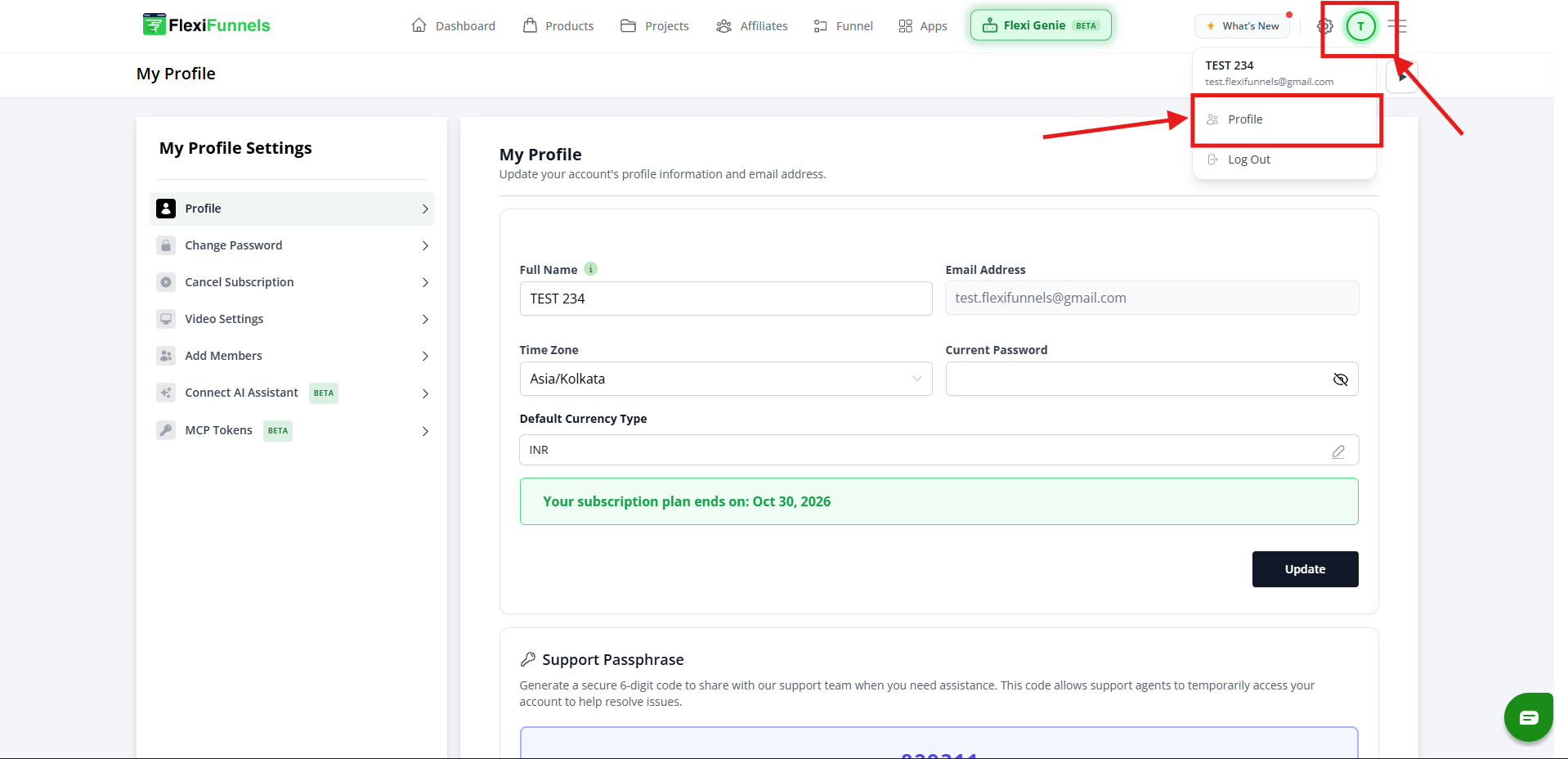
Click on My Profile inside your FlexiFunnels account.
2. Click on Video Settings and Enable DRM
Click on "Video Settings" and select the checkbox to enable DRM protection for your account.
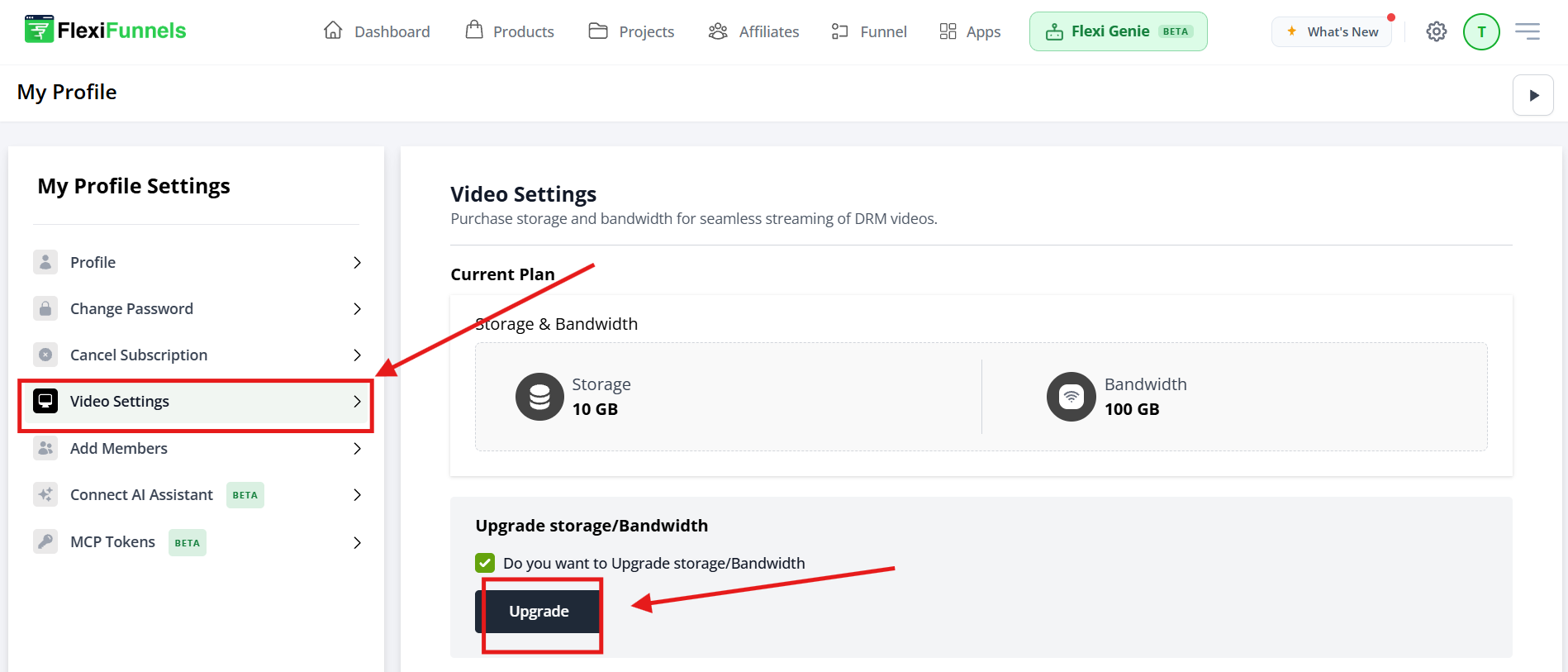
This is the minimum possible storage/bandwidth cost as per the regular market rates. FlexiFunnels is absorbing part of the cost to help you get DRM-secured hosting at the lowest possible price.
How to Add a DRM Video to a Course Lesson
Once DRM is enabled on your account, you can start uploading DRM-protected videos into your course lessons. Here's how, step by step:
1. Open the Course Curriculum and Click the Edit Icon
Go to your membership, open your course, and find the lesson you want to add a video to. Click the pencil (edit) icon on the right side of the lesson row.
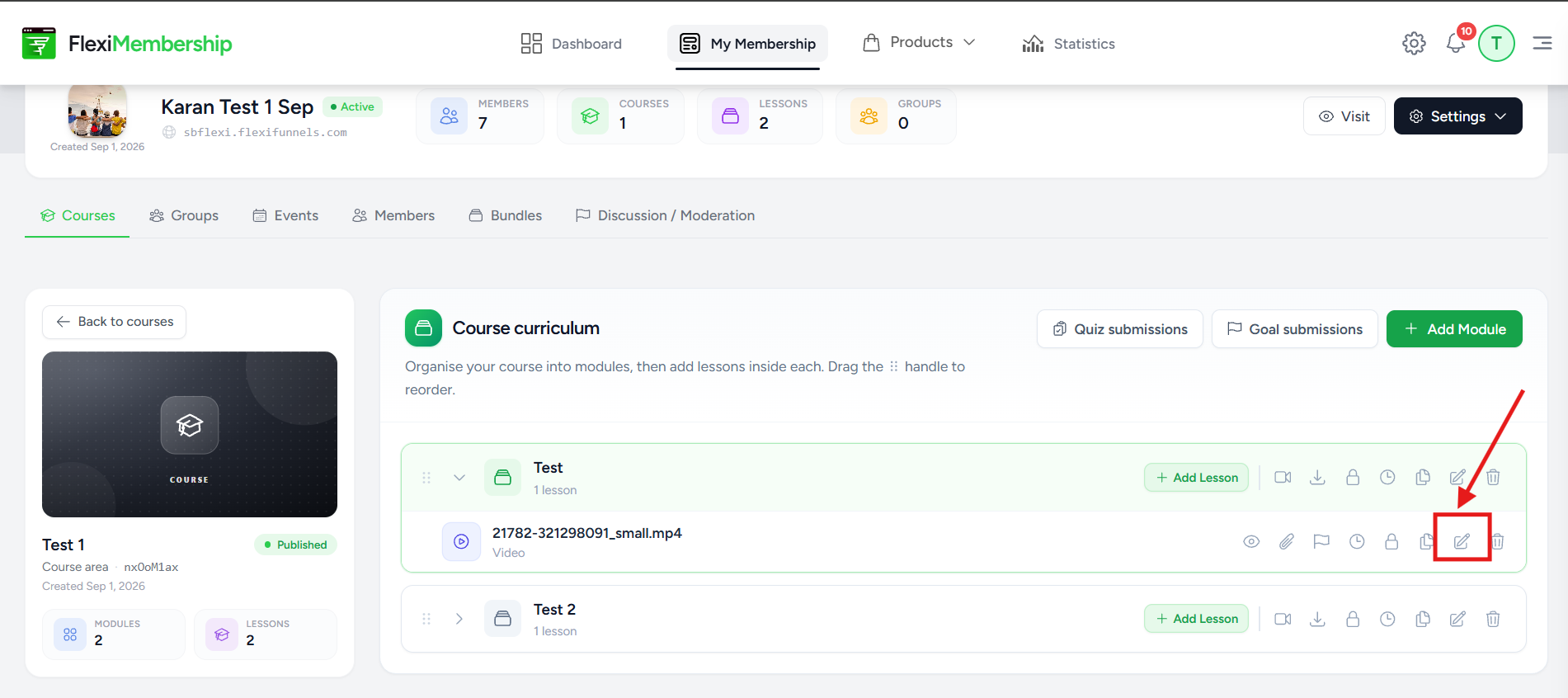
Click the pencil icon on the lesson to open its edit panel
2. Click "Choose" to Pick a Video
The Edit Lesson window opens. Under Lesson Details, find the Video section and click the Choose button.
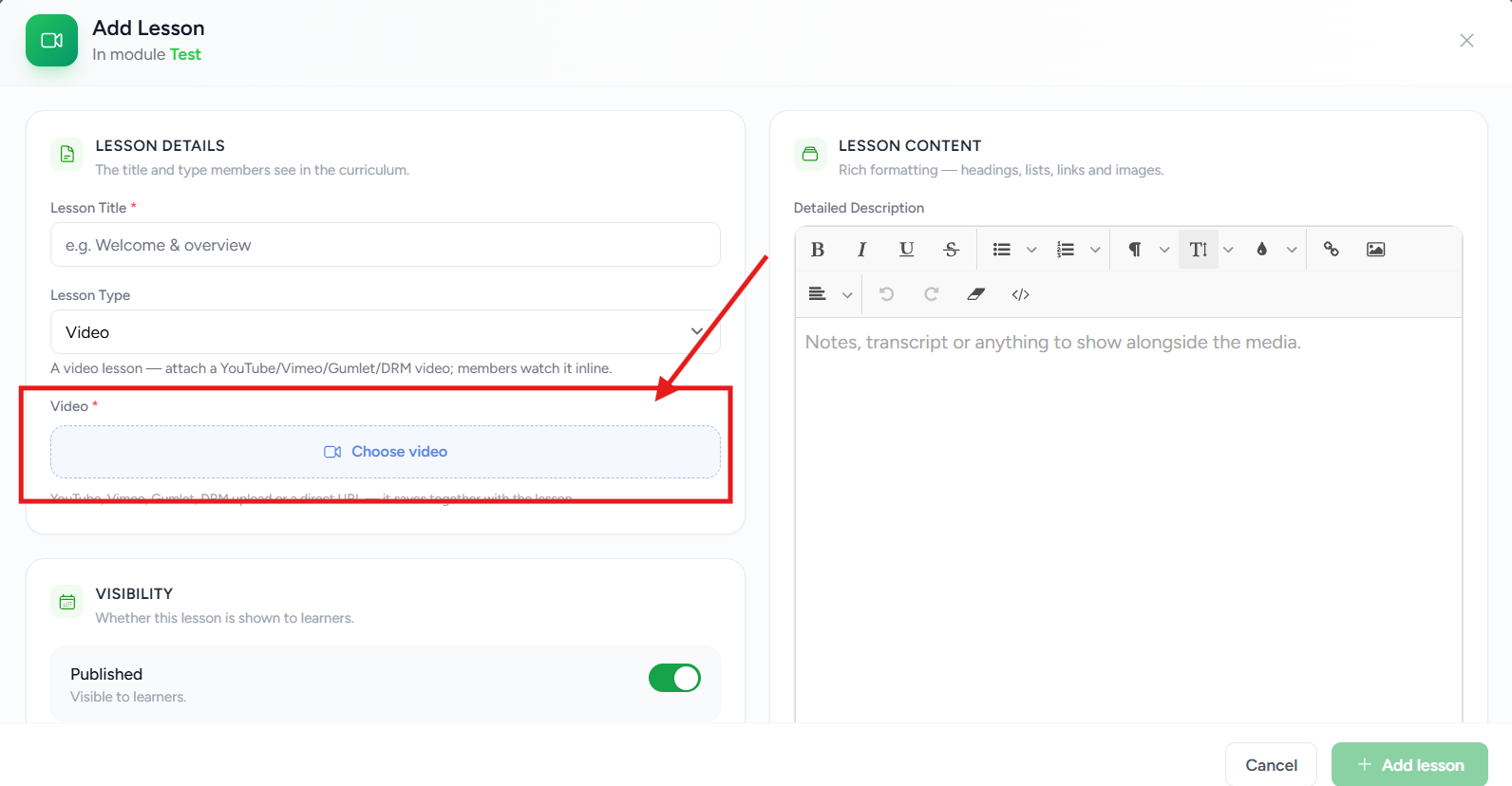
Click the Choose button in the Video section of the Edit Lesson panel
3 Select the "DRM Upload" Tab
The Lesson video picker opens. Click the DRM Upload tab. You'll see:
- The terms — read them and tick the "I agree to the above terms and conditions" checkbox.
- An Upload your video file button — click it to upload a new video from your computer (maximum 1 GB per upload; compress with HandBrake first for best results).
- Your DRM Library — any videos you've already uploaded appear here with a Use button to select them.
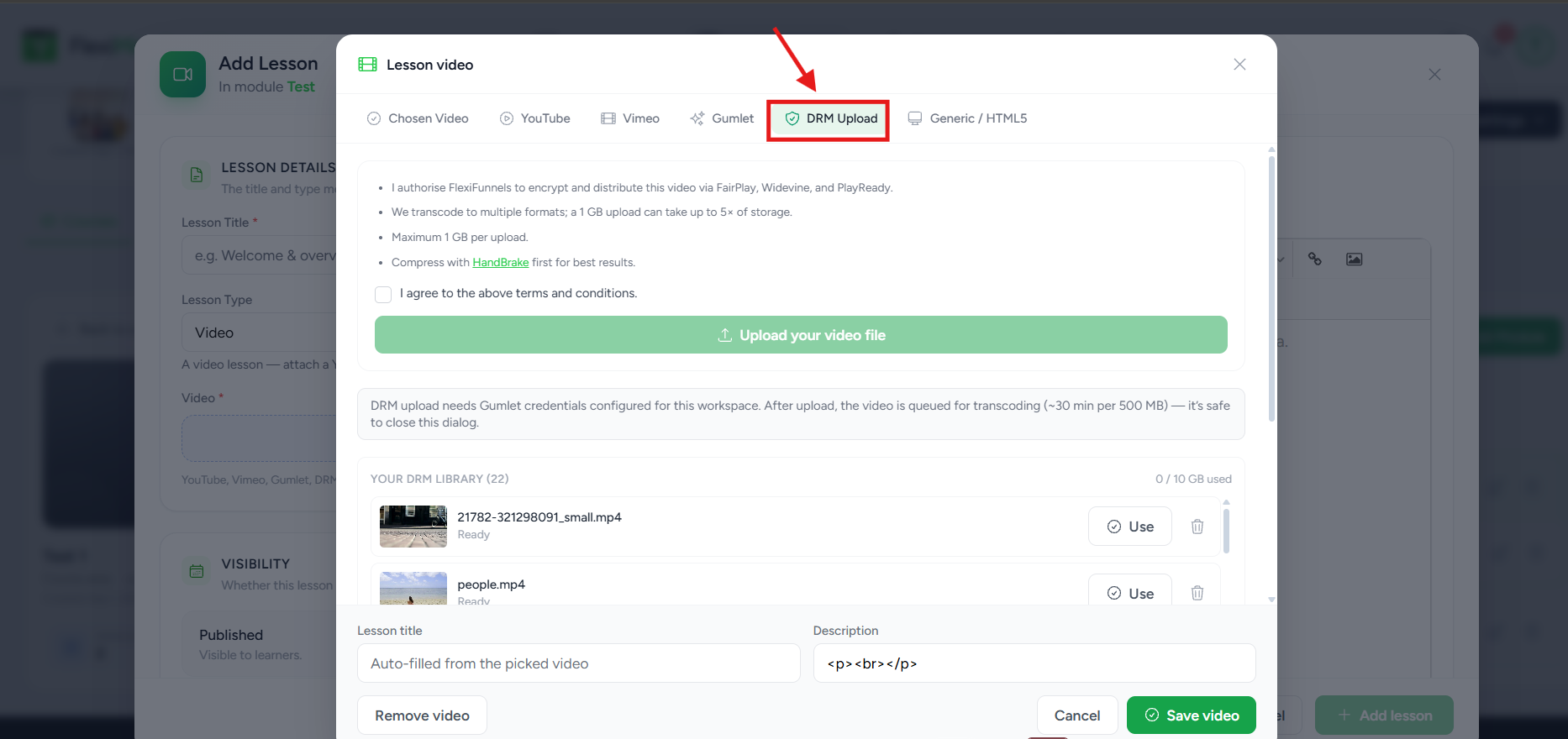
Select DRM Upload, agree to the terms, then upload a new file or click Use on a video already in your DRM Library
4. Save the Lesson
Once you've selected your video and it shows as the chosen video, click Save video, then click Save Changes on the Edit Lesson window to confirm.
Costs Explained
Storage & Bandwidth
After your free quota, you only pay for what you actually use (pay-per-usage — no fixed monthly fee):
- Storage: ₹60 per GB per year (~$0.7)
- Bandwidth: ₹5 per GB (~$0.06)
(Dollar prices vary with exchange rates.)
To buy more storage/bandwidth:
- Click My Profile inside your FlexiFunnels account.
- Click Video Settings and select the checkbox to add the storage/bandwidth you need.
Reduce Your Cost by Compressing Videos
Compress your video files before uploading to shrink their size and lower your storage/bandwidth cost.
We recommend HandBrake — it's free and can reduce file size by up to ~90% with little quality loss.
- Download HandBrake —
https://handbrake.fr/downloads.php - Watch how to compress a video using HandBrake
DRM Protection Fee
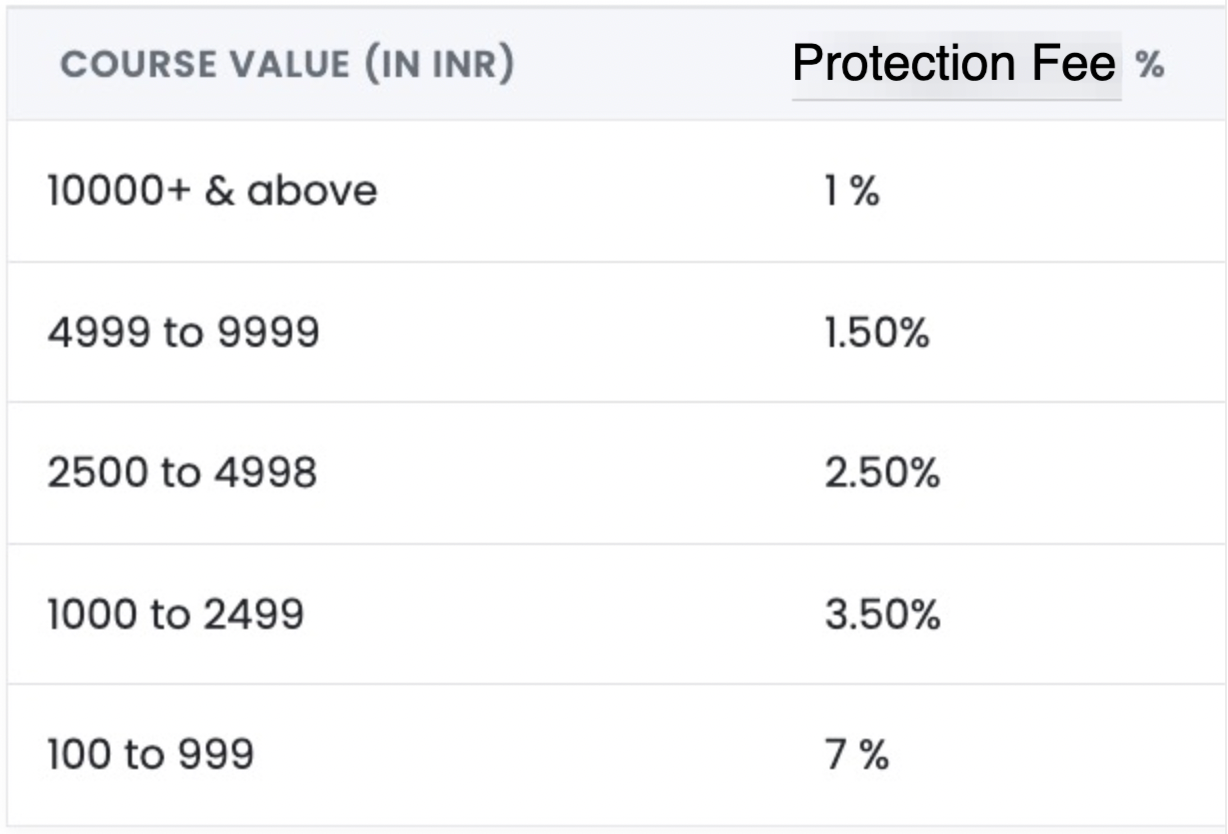
A small DRM fee applies when a buyer purchases a DRM-protected course. It's not always an extra charge — it's often the same 1% you'd pay anyway:
| Course Price | Total Charge | Extra DRM Fee on Top of the Regular 1% |
|---|---|---|
| ₹10,000 and above | 1% | None — just the regular transaction fee |
| ₹5,000 – ₹9,999 | 1.5% | 0.5% |
| Below ₹100 | — | DRM not available |
For other price bands, check the full fee table inside your FlexiFunnels account.
Important notes:
- The DRM fee is deducted automatically when a buyer purchases your course.
- You cannot sell a DRM-protected course for less than ₹100. For very cheap courses, host the videos on YouTube/Vimeo instead — piracy isn't really a concern at that price level.
- If your course videos are hosted on YouTube, Vimeo, or another third party, no DRM fee applies — but those videos also won't be DRM-secured.
Manually Adding Members (for Direct Payments)
Sometimes a buyer pays you directly (e.g. via UPI) instead of through your checkout page. In that case, give them access manually:
- Go to My Profile in FlexiFunnels.
- Click Add Members.
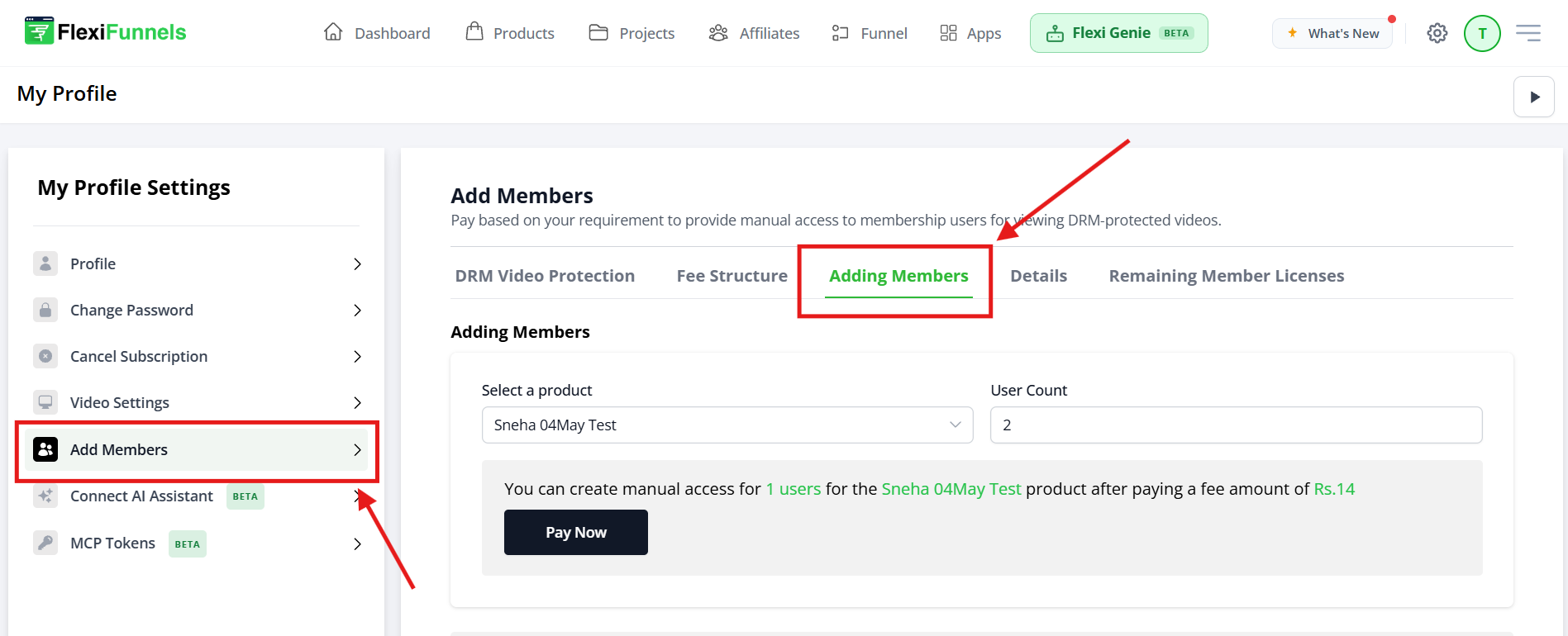
- Use the Select Product dropdown to pick the course.
- Enter the number of users to give access to.
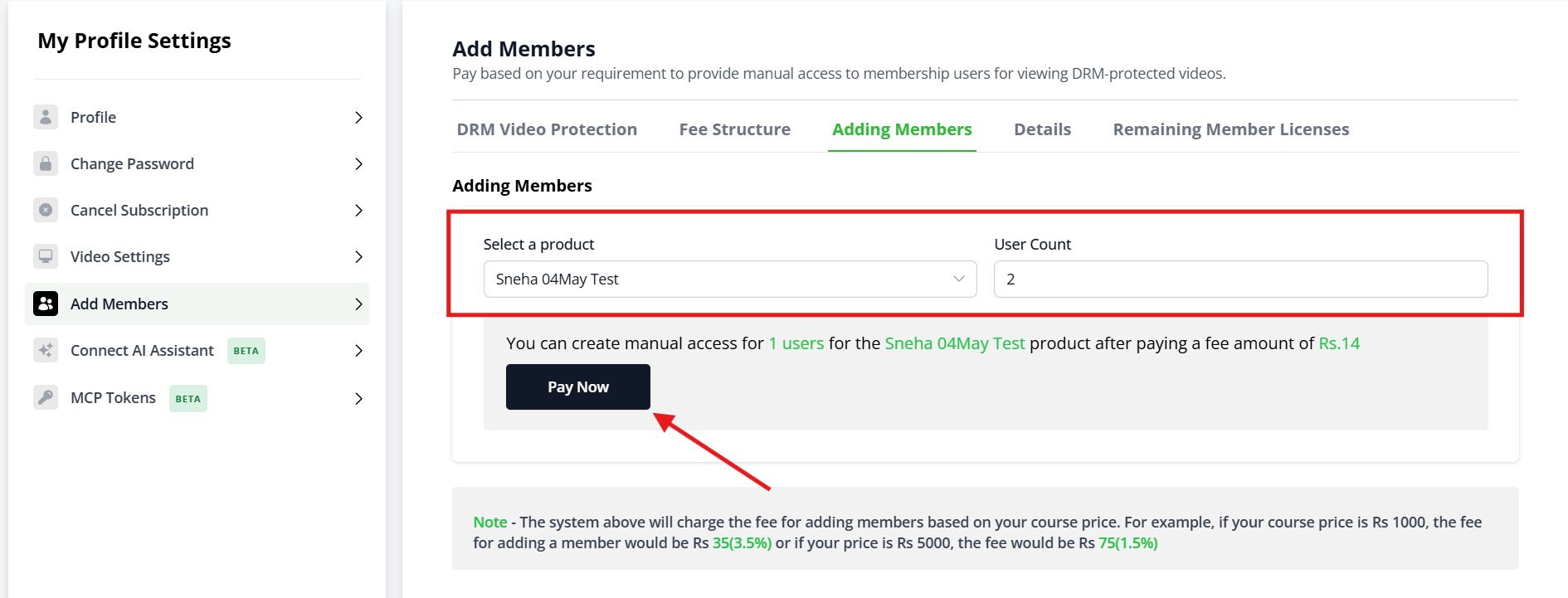
For DRM courses, you'll pay the small DRM Protection Fee for that number of members, then add them.
Course piracy is a huge challenge for course creators. I have been a successful course seller myself in the past and I have faced massive course piracy issues.
I used to sell my course "Timeline Domination" for Rs 28,000. Though we were making good sales, every month we were losing at least 20–30 extra sales because of course piracy. That's almost Rs 9 Lakh loss every month. Plus it is not just the revenue loss, it is also a loss of successful case studies. That's a massive loss.
There were scammers reaching out to my social media followers, commenting on my ads, and selling my course at a far lesser price. It became so bad that we had to create a 2-member team just to stop piracy, prepare a sheet of all the scammers, and work with a lawyer to officially take action.
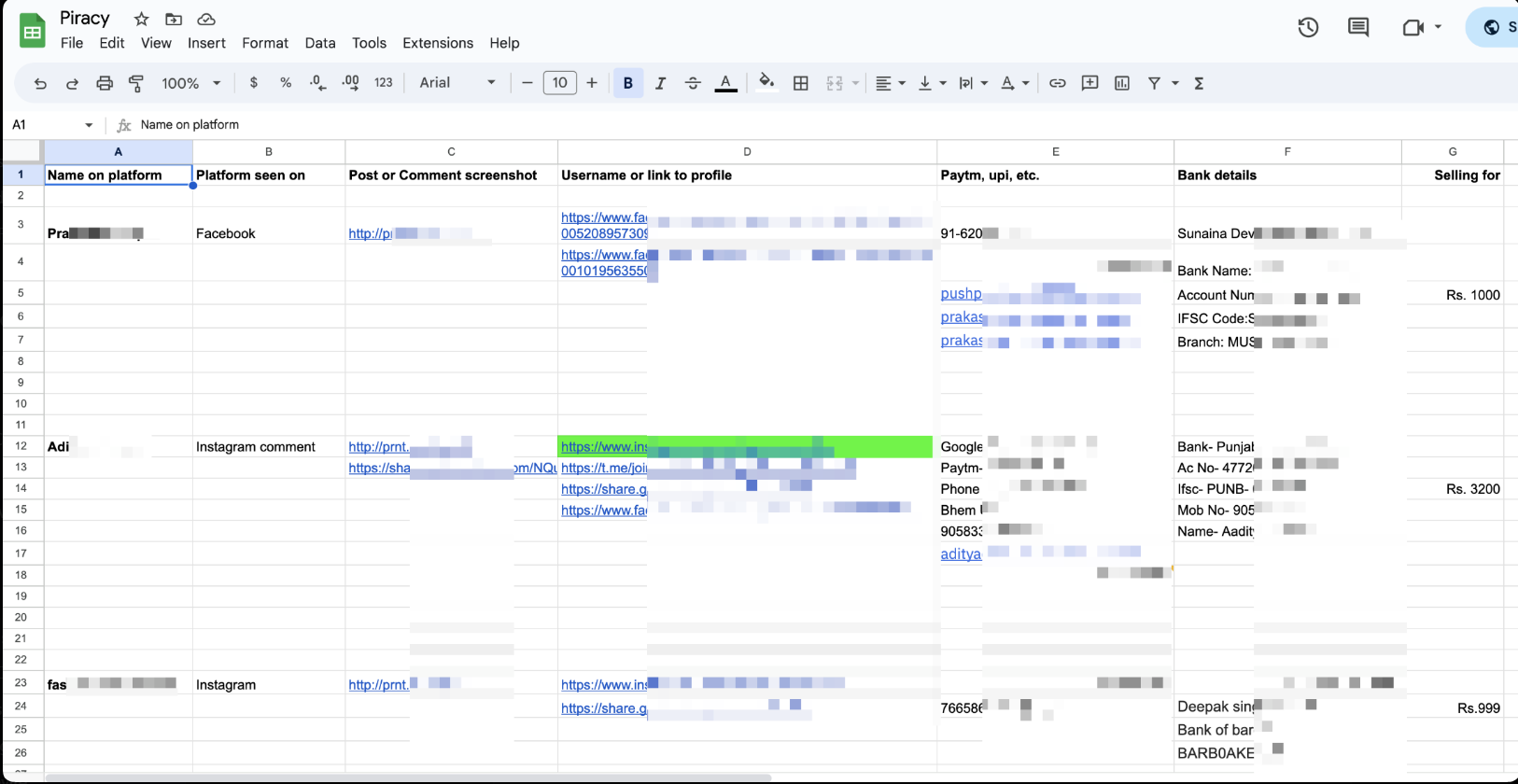
There were more than 250+ names in that sheet alone doing my course piracy. It was a big time + effort + focus + revenue loss.
That's the reason why when we decided to launch FlexiFunnels, we were very clear that we would provide DRM video protection service to our customers — so you don't have to face the challenges and losses I had to.
We worked extensively for 6 months alone just to ensure course DRM protection for you when you sell your course on FlexiFunnels, and we've provided it at the lowest possible market price.
Just to give you an idea of the market pricing, here is a screenshot of the email I received from Vimeo after my course started doing decent sales:
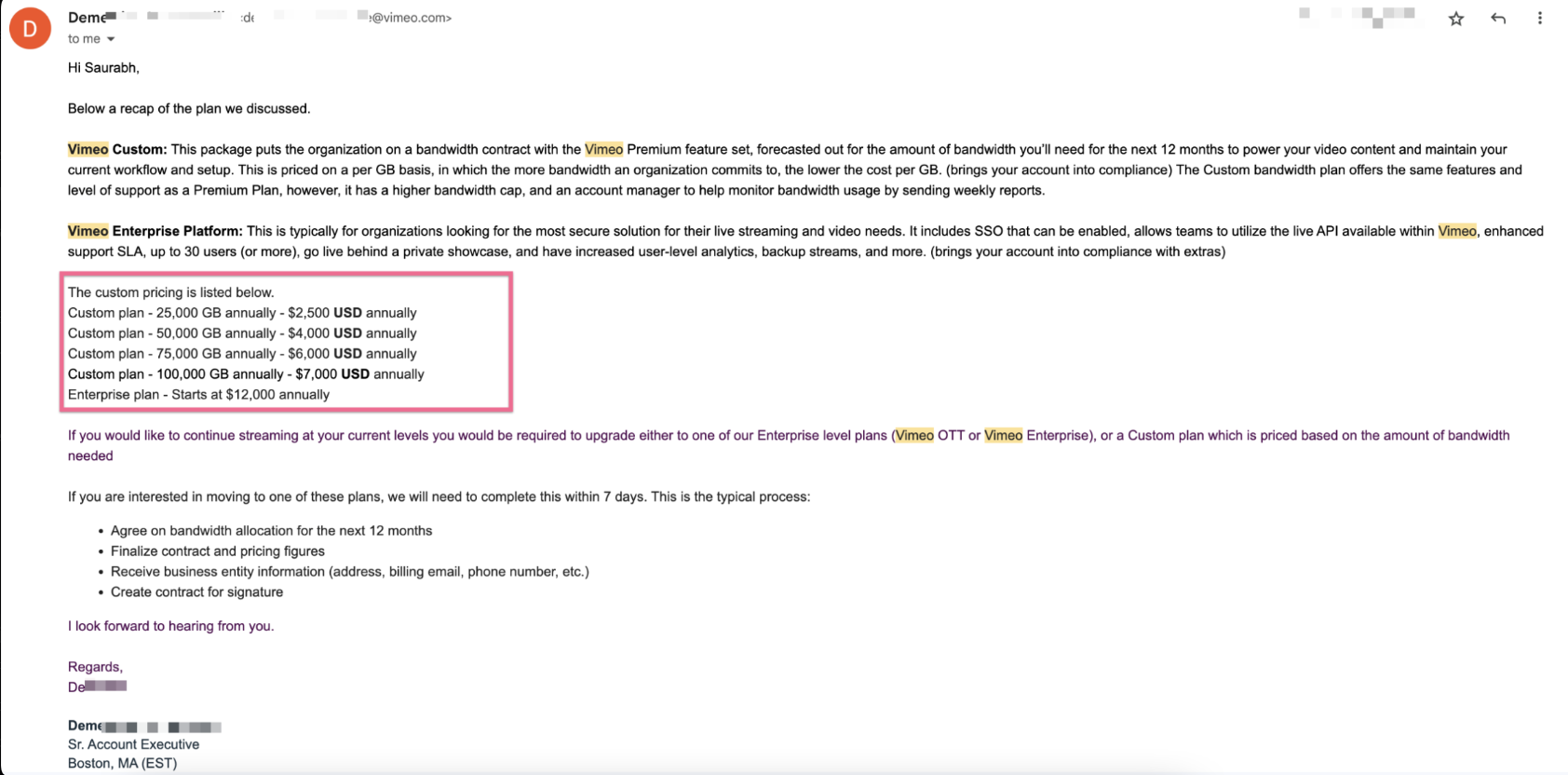
As you can see, I was getting Non-DRM video hosting from Vimeo at $0.10/GB bandwidth (25,000 GB plan) or $0.07/GB (100,000 GB plan). The problem was:
- Non-DRM secured — my course was always at risk of piracy, which actually happened
- The price I paid was MUCH MORE — FlexiFunnels provides DRM-secured video hosting at just $0.06/GB bandwidth
- With Vimeo I had to commit to the full annual plan whether I used it or not — with FlexiFunnels you only pay for what you actually use
In short: I was paying almost double per GB to Vimeo for Non-DRM video hosting, and not even consuming the full quota. Inside FlexiFunnels, we've ensured the lowest cost for
DRM-secured content on a pay-per-usage model.
Please Note: We are not able to provide DRM protection for courses priced below Rs 100. The DRM protection fee would be too low for us to sustain the service at that price — and at under Rs 100, no one would bother to pirate and resell it anyway. So for those courses, you can host videos on YouTube or Vimeo and host the course on FlexiFunnels (no DRM fee will apply).
For your higher-priced courses, ensure they are DRM-level secured to avoid all the troubles and losses you can face in the future. But don't worry — we've ensured this for you. ?
Common Situations & Quick Fixes
Before contacting support, check these — they cover the most common DRM questions.
Was this article helpful?
That’s Great!
Thank you for your feedback
Sorry! We couldn't be helpful
Thank you for your feedback
Feedback sent
We appreciate your effort and will try to fix the article